Daz Studio PostgreSQL error now always, did Windows 11 updates cause it?
 nokoteb99
Posts: 943
nokoteb99
Posts: 943
On some weekends i take my USB 5Terabyte drive with Daz and my total content installed to my relatives so i can work on some daz stuff. I've been using it fine until about 4 weeks ago it started not working anymore. I'm getting this message saying "A Valid postgreSQL CMS could not be created" An dbasically i have no access to any of my content, i cannot even start CMS in Preferences/CMS.
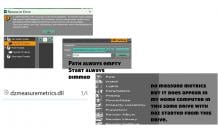
Besides that, Plugins like MeasureMetrics that i have in my plugins directory don't even show up in the Window Menu/Panes.
And in this relative's coputer they have Windows 11. In my own home computer i have Windows 10( and can't even update to 11 cause my computer is too old) but this same drive with the same installation, if i open the daz on it and start it up works perfectly on my computer, no problems. Everything works.
I'm starting to think the Windows 11 updates did something that messed up something that Daz or PostgreSQL needs.
By the way i install everything manually in my windows content including postgreSQL some things threads i've seen talk about using DIM. I don't use DIM at all. I install everything manually. So i installed postgreSQL with the daz installer that was in the manual zip file. And everything was working for about a year in my relative's Windows 11 Pc until about 4 weeks ago when i started getting postgreSQL errors all of the sudden.
Can anything be done to fix this or is this the end of using the Daz in Windows 11? Cause there's no problems in my Windows 10 computer even using the Daz Studio and content in the same USB drive.

Daz 3D is part of 
Connect
DAZ Productions, Inc.
7533 S Center View Ct #4664
West Jordan, UT 84084
Licensing Agreement | Terms of Service | Privacy Policy | EULA
© 2026 Daz Productions Inc. All Rights Reserved.
Comments
Can you still acess the content though the Content Library pane, under Daz Studio Formats?
No you can even see in the picture the DazStudio parent folder contains the MyDaz3DLibrary folder and it doesn't have any arrows to expand it to see all the children folder folders, which it usually did before. the 4 weeks i mentioned. And it's because at the start i get that error i posted in the picture and i also posted how in the settings CMS is not even started and you cannot start it.
i don't know but i even tried today reaching to Microsoft Chat support, they had no idea how to help me.
Because i told him that my daz studio in and content running fro the same drive works totally fine in my home Windows 10 computer, but that support person didn't help. He probably just knows about sales and stuff. He was just giving me canned answers probably copied from AI or something and i told him "No no...this doesn't sound like you're actually coming up with the answers. you're just copying them from somewhere" LOL. Then he changed his tune but i had to leave.
But anyways thanks for trying to help. Maybe theres no solution.
If so, then i'll just work on daz on my Win 10 computer and not bring my daz stuff to my relative's Win11 computer.
The Content Library pane under Daz Studio pane goes by files on disc, t does not use the Content Management System to populate the list. If that is empty then the content is not where the settingss ay it is - possibly an external drive has a different letter assigned for some reason, or OneDrive has decided to move everything, or you accidentally moved, renamed, or deleted some folders.
"The Content Library pane under Daz Studio pane goes by files on disc, t does not use the Content Management System to populate the list. If that is empty then the content is not where the settingss ay it is - possibly an external drive has a different letter assigned for some reason, or OneDrive has decided to move everything, or you accidentally moved, renamed, or deleted some folders."
Really? Then anyways, how is it that i just take the same exact drive that i was trying to use Daz Studio ( that's installed on it, and PostgreSQL is installed on it too, and all my 300GB of content is installed on it) and i do not change a thing and now i'm back in my home( the Windows 11 PC is at my relatives. I bought it for them but they don't use it much , when i go i use it), and my PC here is Windows 10. I just plug my same exact USB External drive which has the exact same letter E:/ ( that it had when i used it in the Windows 11) and everything works, No PostgreSQL CMS errors at the start and everything works. What could be messing up my entire experience in the W11 PC. I made an image detailing how everything works once i just plug in the drive to my Windows 10 PC and start up the installed Daz Studio that is installed in that drive( ver 4.24 by the way)
That same folder that shows no content in the Content library tab/ Pane( in the first picture i showed you that was a picture taken when using the W11 PC), now is full of content.
You didn't install DS4 onto their PC, as a result W11's security systems have kicked in, decided the CMS is a virus and blocked it from running.
That list is not based on the CMS, if t was empty on the other system the settings were wrong or something was blocking it.
As I understand it, that's not the way it's supposed to be used. That is, daz studio stores plenty of information in the windows registry, it is not a portable application, you can't store it in a disk and use it around in any PC. What you can do is install daz studio in both PCs then setup the CDM to use the usb disk. If you use DIM you have to setup DIM as well.
As a side note I see you keep the CMS cluster in C:, so it's not in your usb disk.
Oh so if i install Daz studio in the Win 11PC , will it work? but the PC just has 256GB hard drive so my 300GB+ User folder( containing my content including MyDaz3DLibrary) doesn't fit. Can i change the paths to the content to my USB drive for the content?
So basically, all i need to correct it is install Daz and postgressSQL in the C drive of the W11 Pc? That solves it?
Cause theW11 PC has space for Daz Studio and PostgressSQL, it does not have space for my content.
Too bad thte W11 Security Systems changed to think my USB drive installation is a virus. i was using it fine for 1 year from the USB drive.
The executables (DS iitself, plug-ins, PostgreSQL) need to be installed locally. Then they can point to an external drive for content and the actual database (so your figures, clothes, props, scripts, and the Content Cluster folder).