Help adjusting Texture Shaded view in Daz 6
 joshbolin75_c4ffe3e8c0
Posts: 23
joshbolin75_c4ffe3e8c0
Posts: 23
In Daz4.24, the texture shaded view gave you a decent view of the character without being too bright. In Daz 6, the exact same character and view gives you a much brighter view of the character almost as if it is partially rendering the iray skin just in Texture Shaded draw settings. Is there any way to make it default back to the Daz 4.24 Texture Shaded view. Examples below.
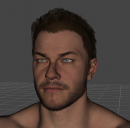
Thomas-9-Alan-Ritchson-Beard.tip.png
1173 x 1153 - 1M
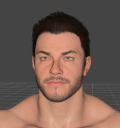
Screenshot 2026-06-04 154803.png
942 x 1005 - 740K

Daz 3D is part of 
Connect
DAZ Productions, Inc.
7533 S Center View Ct #4664
West Jordan, UT 84084
Licensing Agreement | Terms of Service | Privacy Policy | EULA
© 2026 Daz Productions Inc. All Rights Reserved.
Comments
i have the same probleme, and for some raison textures of my caractere browns are not rendered in texture shaded while some transparency. the same issues withs object like glass. I test the universal shaded and it's the same issue
It more looks like to me, the headlight of the camera is brighter by default.
This one is going to be easy adjusting too; it's very similar to the textured style in Blender. The pros here far outweigh the cons.
It makes it almost cartoonish bright though. I'm just looking to tone it down a bit. Like someone else commented, it's like the default light is too bright.
That helped. Toned down the brightness just enough. THANK YOU!