Objects change position after drag and drop to be parented
 tam_c3df5332fc
Posts: 147
tam_c3df5332fc
Posts: 147
Hey everyone,
This started happening to me only recently version 4.20 Windows 11
I have saved a preset for a set of lights - five - two in front and three behind - BTW, I can import an object and the same thing will happen that I am about to describe, so please do not focus on the five lights
After whatever object I select, drag & drop to be parented onto the hip of the character so that it can follow it around (please do not focus on drag & drop to the hip because this happens if drag & drop the objects to be parented onto the head or any other part of the character's body)
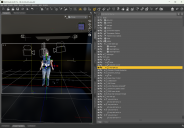
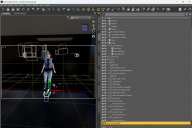
What happens at this point is the object(s) will suddenly dramatically change positions - see attached screenshots - the lights went from where they are supposed to be, to all the way out of the scene
Why did this just start happening without performing an update or installing anything new?
Is there some setting that I have accidentally switched on? Do I have be in a certain tool set before trying to parent an object to a character
Thanks in advance

Daz 3D is part of 
Connect
DAZ Productions, Inc.
7533 S Center View Ct #4664
West Jordan, UT 84084
Licensing Agreement | Terms of Service | Privacy Policy | EULA
© 2026 Daz Productions Inc. All Rights Reserved.
Comments
Can you please attach your log in a text file and attach it to a post so we can look and see if anything is out of place?
Not something I've experienced myself so I can only guess. Maybe DoF settings or something like that? The way my logical brain works suggests that if DoF is somehow parenting in a priority status, it will move the lights/cameras to suit. Just a thought.
Is it possible the "parent object in place" setting got unselected? It's in the hamburger menu under "Parenting". This setting used to be in a more prominent place, but now it's buried.
Thank you so much @thoreandan
That was it. Somehow it became unselected, now everything works as expect - thank you thank you thank you