How Do you Actually Make A Realistic Female G8 Shape?
 nokoteb99
Posts: 943
nokoteb99
Posts: 943
The Daz store and third party stores are flooded with products that promise Full Body morphs that convert your plain unrealistic default Genesis 8 Figure into a realistic attractive woman and the vendors even post tons of pictures that look realistic. But when you get those products and apply those full body morphs, they don't look at all like the promo pics.
For example Z Curvy Beauty Shape and Pose Mega Set Has a Full Body morph and in the promo pictures they post it as if that's what it's gonna look if you apply it to the default G8. But that's now how it looks at alll. All the morph does is Shape the hips , add some to the upper thighs. That's basically it. It doesn't do anything to the calves or shins. Doesn't add nothing to the buttocks, the arms remain Twigs just like the default Genesis 8 Female is.
[...]
I got other products that promise things and have all these promo pics depicting great shapes but then you get the product and it doesn't really make your figure look that way:
Z Calendar Girl Shape and Pose Mega Set for Genesis 9 and 8 Female
Z Glamorous Curves Shape and Pose Mega Set
Z For the Love of Curves Shapes and Poses
How do you then , create a realistic Female? I know i have the DAZ3D Body morphs and even EJ Body morphs for editing body parts morphs individually but I'm not an expert in anatomy and i have tried dong it that way and everything turns out looking a bit good but not realistic.
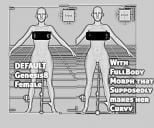
By the way here's a picture that shows How my default genesis 8 Female looks after i apply the product Z Curvy Beauty Shape and Pose Mega Set. Notice how the arms remain twig like, nothing changes, calvese, shins remain twig like. About the only thing that change is the hip widened and upper thighs got alitle wider. That's it, not even the Buttocks got any bigger.
And whenever i try to add stuff on my own( increase size in shins, calves, Thihgh back, and add one morph for Buttocks that i bought), it ends up looking bad and not natural. Then the head also starts looking like out of place like it's too small.
Also when i add my third party Buttock morph it messes with the Hip look and it adds padding like it makes it very round( making the girl look like a stuffed doll). I have no clue how to achieve something Realistic looking.
If anyone has any tips. Please post below.
By the way someone recommended this product, that it's better than using any of the mentioned products above: Body Diversity for Genesis 8
https://www.daz3d.com/body-diversity-morphs-for-genesis-8-females
But it's confusing because, it seems to be a product that only contains a set of Full body morphs But it also says it contains morphs to shape the legs more realistic( all at once instead of dealing with calives, shins, thigh individually), etc and i don't find those morphs at all( i actually got this product too ) in the Content Library/Genesis8Female/Shapes/BodyDiversity. All there is in there is the Full Body Shapes.
Anyway if anyone can help. I'll leave you with a picture of Genesis 8 Default and then Genesis 8 with added ZCurvyBeautyShape so you can see the advertising promo pics doesn't do justtice.

Daz 3D is part of 
Connect
DAZ Productions, Inc.
7533 S Center View Ct #4664
West Jordan, UT 84084
Licensing Agreement | Terms of Service | Privacy Policy | EULA
© 2026 Daz Productions Inc. All Rights Reserved.
Comments
I would say that most morphs don't aim for "realistic" - they are more pitched towards "idealised". However, they should still produce the results in the promo images if all is well. As you seem to be having issues with multiple products, do you definitely have the prerequisites downloaded and installed. The first two that you mentioned have a dependancy on Genesis 8 Female Body Morphs - have you purchased that and is it correctly installed? If that is not the case then this will definitely cause them to not work as expected.
If you think all is correctly installed then check the log file to see if relevant errors are reported - I think for missing morph dependancies then you'd probably see a bunch of "missing formulas" but I could be wrong there. Maybe open the log and wipe the contents, then load a G8F and re-open the log to limit the log entries to things relevant to loading of that figure. Alternatively, wipe the log after loading the G8F, apply a morph that does not seem to work and then check the log again and it would hopefully just list things relative to the misbehaving morph.
I do have the products you mentioned and so could dig into them myself after lunch if there is anything more specifc I could test.
It's quite difficult, as said before, most seller figures are idealised, I don't think reality is really bankable !
The only way I found was having photo references and trying to morph the Gen figures to look like real people, it's really time consuming in fact !
Some other stores do sell more realistic people, the price is not really the same.
This is what I get when applying the full body morph from the Z Curvy Beauty Shape product with a plain G8F to the left for comparison.
Moved to Art Studio as it is not a Daz Studio application topic. Minor edit to text.
I suspect part of the iissue may be the definition of "realistic" Also, camera settings - especially focal length - matter.