Putting a logo on Genesis Supersuit?
 percivalconstantine
Posts: 10
percivalconstantine
Posts: 10
I've got the Genesis Supersuit and I'd like to put an emblem on my character's chest. Problem is one of the things that makes this suit so versatile is also what seems to be tripping me up — there are tons of little segments here so it seems like making a copy of the texture and adding a logo on top of that or even LIE don't do anything.
Here's what I see in Daz:

This is the image I'd like to put on:

This is a rough idea of what I'd like it to look like:
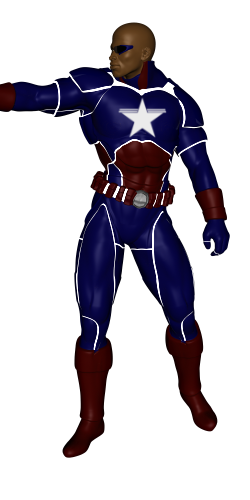
Is this possible with Supersuit or do I just have to do this manually in Affinity?

Daz 3D is part of 
Connect
DAZ Productions, Inc.
7533 S Center View Ct #4664
West Jordan, UT 84084
Licensing Agreement | Terms of Service | Privacy Policy | EULA
© 2026 Daz Productions Inc. All Rights Reserved.
Comments
If you are rendering in Iray you could use a Decal node to project the logo using the UVs - Create menu
a decal might work
I know what you mean about the supersuit, it has a lot of individual surfaces
I actually edited and created a separate version using the geometry editor to select and re-asign surfaces saving it as a support asset with a unique ID
Yes, if you have a configuration of surfaces that you want to keep together for a particular look or looks then making a variant with combined surface groups is a good solution.
Not sure if this can be done with the Supersuit. I get a black box around the decal despite the transparent background and positioning it seems pretty much the same PITA as doing it in post. I was able to get it on the figure, but the design repeats throughout the entire supersuit when I try to resize it. Here are a few examples of what I'm getting.
It seems that you're using a black and white logo, so I would replace the transparent background by a black one then I would put that black and white logo both in the Base color slot and the Cutout opacity slot.
If you want a color logo, you'll have to create an opacity map too: black is transparent, white is visible, and you can use various shades of gray to get various level of opacity.