Voronoi Shatter Tool for DAZ Studio [Not For Sale Here]
 umblefugly
Posts: 172
umblefugly
Posts: 172
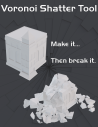
Voronoi Shatter Tool
Break it. Blast it. Bake it.
Bring breakable props, flying debris, cracked surfaces, and animated destruction directly into Daz Studio.
Voronoi Shatter Tool lets you fracture mesh props into real shard geometry, create dramatic still-image breakage, or run PhysX-based simulations for impacts, falling debris, blast effects, and animated destruction. From cracked barrels and shattered windows to collapsing statues and scattered wreckage, it gives Daz Studio artists a practical destruction workflow without leaving Daz Studio.
What You Can Do
- Create shattered mesh props for still renders
- Simulate animated impacts and debris
- Break objects on impact, on a chosen frame, or through glass-style hit behavior
- Launch objects toward targets
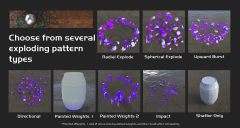
- Create explosion-style shard motion
- Turn static shattered pieces into dynamic simulation objects
- Keep selected areas visually pinned with protected-zone paint maps
- Save, reload, clean up, and export baked shatter results
Main Features
Static Shatter
- Fast static fracture for still-image work
- Creates grouped shard geometry from selected mesh props
- Source object can be hidden instead of destroyed
- Useful for cracked props, pre-broken objects, rubble, and stylized debris layouts
PhysX Simulation
- Assign scene objects as static, dynamic, breakable, or static until hit
- Simulate impacts, falling pieces, projectiles, and blast-style motion
- Bake generated shard animation into the Daz Studio timeline
- Clear and rerun simulations while testing different setups
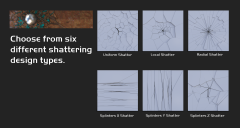
Fracture Styles
- Uniform breakage for general destruction
- Radial patterns for glass-like or center-out damage
- Local patterns for focused impact areas
- Splinter patterns for wood, boards, beams, and long fragments
Impact and Motion Controls
- Break on frame
- Break on impact
- Break-through / glass-style shattering
- Launch targets
- Blast centers and directional markers
- Explosion force and shard motion controls
- Static Until Hit behavior for staged breakaway pieces
Mesh Prep Tools
- Repair common problem meshes before shattering
- Weld split vertices
- Remove degenerate or duplicate triangles
- Close holes where possible
- Create a repaired duplicate instead of damaging the original prop
Protected-Zone Paint Maps
- Paint areas that should stay visually anchored during static shatter layout
- Useful for controlled cracking, attached fragments, or pinned shard compositions
- Helps keep selected regions in place while other shards separate
Material Options
- Preserve outside source material appearance where possible
- Set custom inside shard colors
- Add optional inside textures
- Use shared material behavior for better performance on large shard counts
- Companion helper script included for material cleanup workflows
Packages, Cleanup, and Export
- Save and load shatter/simulation packages
- Preserve helper nulls used for targets and blast controls
- Restore hidden source objects
- Clear generated simulation data
- View diagnostic logs
- Export baked results as a glTF cache for portable geometry and animation workflows
Great For
- Broken barrels, crates, bottles, rocks, statues, walls, and props
- Shattered glass and impact damage
- Rubble piles and debris fields
- Animated destruction shots
- Exploded-view fracture renders
- Fantasy, sci-fi, horror, action, and disaster scenes
Important Notes
Voronoi Shatter Tool is built for practical Daz Studio destruction effects, not engineering-grade structural simulation. Clean, closed mesh geometry works best. Very high shard counts can create heavy Daz Studio scenes, so test with lower counts first and increase detail once the result is stable.
glTF export is intended as a baked geometry and animation cache. It supports practical material approximation for common file-backed textures, but complex Daz/Iray shader networks may need cleanup in the destination application.
Compatibility
- Daz Studio 4.24.x.x
- Daz Studio 6.25.2026.xxxxx
- 64-bit Windows only

Daz 3D is part of 
Connect
DAZ Productions, Inc.
7533 S Center View Ct #4664
West Jordan, UT 84084
Licensing Agreement | Terms of Service | Privacy Policy | EULA
© 2026 Daz Productions Inc. All Rights Reserved.
Comments
Sounds interesting. How much is it influenced by the existing topology of the object that you put into it?
For the current V1 shatter system, the fracture pattern is not driven by the original mesh topology in the way a pre-cut polygon modeler would be. It is driven mainly by:
So a cube with 12 triangles and a cube with many clean coplanar subdivisions should generally produce the same kind of shatter if their shape, scale, settings, and watertightness are equivalent.
But topology still matters for reliability and cleanup:
So the short version: topology does not artistically control the fracture layout right now; geometry shape and settings do. But bad topology can still make the fracture fail, generate unsafe boundary cases, or require fallback cleanup.
Me too lol. I'm just working on some speedups, its pretty fast right now, 2000 pieces simulated over 60 frames CPU shatter + GPU for PhysX + full material/shader copy takes just under 30 seconds on a 10900k, 64 GB DDR4, and a 3090 Ti.
This looks interesting. I find that too many of the products that feature broken building, etc. are too clean in their breaks. Based on the three images that you uploaded, it looks like your product will improve on the broken look of objects.
Yes, for version 1 I just want to lay the groundwork for basics, then if theres enough interest Id like to eventually get it to do more stuff like Pulldownit, RayFireTool,FractureFX etc. for a legit destruction pipeline for DS.
If anyone is interested in reading, I can share the usermanual.
Yes, I'd like t take a look at it.
Here is the manual for now, there may still be additions/edits. Updated the manual here as well.
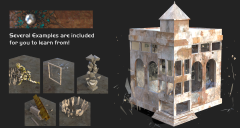
Genesis 9 mesh healed, preshattered with projectiles using nulls as target/impact locations.For higher speed projectiles you may need to increase FPS to mitigate any contact offsets i.e. projectile affecting the shattered mesh before impacting.
Another example preshattered mossy statue, dynamic only.
Even if I submitted it today, the way things are going now, it could be a month and a half away from hitting the store, so I cant give an exact date. I am still making last minute quality changes as well as updating the manual. Props, scenes and Companion script are relatively finished.
Couple more. Barrel "Blast" splinters shatter "Statue". Simulation speeds will slow down a lot when you use heavy meshes with lots of materials. That scene is 173,000 polygons.
Little explosion inside a house/building blowing windows out.
Something to keep in mind, this tool can be thought of as more game-oriented and high piece counts aren"t meant to be the norm. Try to keep pieces 1000 or less per scene if doing it all at once, otherwise, static shatter objects, then re add those to the sim. In that way, you can have thousands of pieces in the scene, but expect playback slowdowns depending on scene "heaviness".as well as if rendering with Iray, it can take awhile for Iray to load everything.
Finally have a working compile for DS 2026 after some growing pains. 2026 (IRay and textured view) does seem to choke on many items (1400 pieces created in that scene) as well as the timeline really struggles, so does 4.24.x.x but less noticably, even with a 3090 Ti, 64 GB DDR4, and a 10900k (I'm poor).
For anyone interested, it wont make it into the first version of the tool because it is still in a WIP stage, but I have Pinning/Anchoring implemented which allows you to control areas to be shattered/affected by PhysX by simply painting some weights on the areas you'd like to keep static. You can see I have overlayed the original painted mesh over the actual shattered portion. The painted areas dont need to be perfect, as the tool converts non zero weights as areas to pin.
Just submitted to store!!
Yeah, PASS queue is a nightmare.
Currently in testing stage :D
Deepest apologies, I have asked the tester to reject the tool. I will not be selling it here. It really pains me, but sales as a PA who needs to survive are just not there.
Let me know where you end up selling it.
I am guessing also there is a limited market
while it sounds awesome, it also sounds very much like what Carrara can do with explode and shatter modifiers and bullet physics and has been able to do for 16 years in my use of it (likely RayDream before it too)
and DAZ has not exactly tried to incorporate any of Carrara's features into studio in the same amount of time they have owned it
I wish you the best and hope you can find a market
admittedly I only own your 3D content as not a big buyer of DAZ studio tools myself prefering other softwares
most tools I do own are so I can do some of the things I can already do in other software in studio only because the content I am rendering doesn't easily export to other software
I always export out of Studio where possible and suspect thats what most do
You can visit my linkedin for updates on me and what I am doing :)