G9 Wet Skin issues

Hi Everyone!
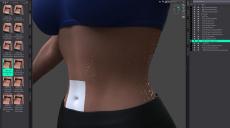
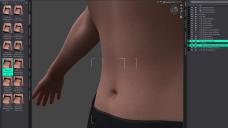
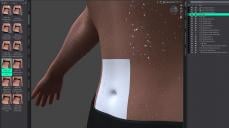
Little help needed here. I'm trying to apply a wet skin to my character and as seen in the screenshot, the texture is well applied to the main body, but makes the Navel shell turn white. If I apply the texture to the Navel first, wet skin works as intended. But as soon as I add it to the main body, changes back to white again. I've tried copying the body skin surface and paste it to the Navel surface, it doesn't do anything. Could anyone advise what could be the issue here and what's a possible workaround to resolve this?
Many thanks in advance!

Daz 3D is part of 
Connect
DAZ Productions, Inc.
7533 S Center View Ct #4664
West Jordan, UT 84084
Licensing Agreement | Terms of Service | Privacy Policy | EULA
© 2026 Daz Productions Inc. All Rights Reserved.
Comments
Hello,
You can solve the problem by clicking on the geoshell parented to the figure (you don't need one parented to the navel), then open the Surface panel.
To illustrate, I only load a Genesis 9 Base figure, and didn't apply skin on that figure, but it's the same process with a skin applied.
You'll see a list of surface, among them one called stx_genesis_9_navel_71_Body:
Click on it and check that it is using 'Iray Uber MDL' as a shader and not PBR Skin (Geoshells automatically create surfaces for geografts, and will apply the shader used on that geograft so if your character is using PBR Skin, the navel surface will be created using PBR Skin). If necessary, apply '!Iray Uber Base' (you can find it in 'Shaders Presets/Iray/Daz Uber'.
Once everything is alright, select then right click on the body surface and select 'Copy Selected Surface(s)'.
Then, select 'stx_genesis_9_navel_71_Body', right click on it and select 'Paste to Selected Surface(s)' and it should fix the problem:
If you have other problems with a product by @V3Digitimes, she usually opens one support thread by products and she's providing excellent support.
For Wet and Tanned 9:
https://www.daz3d.com/forums/discussion/700386/released-wet-and-tanned-skins-for-genesis-9-commercial/p1
Hi,
I can't tell you enough how appreciative I am right now for your help. I had a feeling that somehow this workaround will be the winner (did the same when applied skin texture for the same body parts), but didn't believe that this will be the case for the wet texture too. I thought it will automatically apply the texture. You're a life saver, thank you. And thanks for the tips on support too.
Take care!
Wow! Thanks so much Elor for your support. Maybe I'll add this tip to the documentation, because it's a "shell over geograft" issue which I cannot fix on my side... Or I'll have to think about it a bit more...