Script for rotating, bending, twisting long chained bones
 Lonesome Cowboy
Posts: 169
Lonesome Cowboy
Posts: 169
Hello,
For years now, I’ve been trying to solve the following problem: You have a rope or an object with a very, very large number of bones arranged sequentially - a tail, a snake, an octopus tentacle. And you have to bend, twist, and side-bend them all... it’s a real hassle.
Now i got the solution:
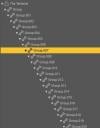
1. Load the object and select the desired starting point in the Scene tab.
2. Double-click the script.
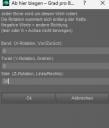
3. Enter the desired values into the dialog box.
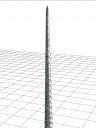
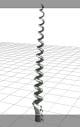
4. The object should now bend, twist or moving side in the specified manner, starting from that selected point. You have to try which movements on which figure work or not.
5. It may not work on Genesis-Figures
Before everyone starts singing my praises: I had actually started working on this script quite some time ago, but just today I had the idea to ask
Claude.ai if it could handle DAZScript.
AND IT CAN!!!
After about 10 failed attempts, Claude.ai finally managed to get the script up and running. I never could have written this entirely on my own, since I only have basic knowledge of DAZScript and the course with Mike D. was a long time ago.
I didn't encrypt it because the main work was from claude.ai and only less people are able to understand the code. So it's free for you, but please don't sell it for money.
And don't worry about the screenshots. It's all translated into english now. Even the code comments, but no guarantee ;-)


Daz 3D is part of 
Connect
DAZ Productions, Inc.
7533 S Center View Ct #4664
West Jordan, UT 84084
Licensing Agreement | Terms of Service | Privacy Policy | EULA
© 2026 Daz Productions Inc. All Rights Reserved.
Comments
Ah, kind of like Easy Pose from back in the day. Pretty cool.
I haven't used Claude to create Daz script, but I'm wondering if it can create dialog widgets like this:
I haven't been able to re-create a Daz dialog like this in script, as I think it's using its own special resources for icons and such.
imgur blocks images for the UK, at least, so I cannot see your screenshot - please try attaching it to your post (use the Attach a File button under the text box, then click Browse to pick a file).
i guess i did so. But the images are in the zip-file too
the script may not work on Genesis-Figures.
The dialog-box was created by me. Claude only made the logic of the recursion attaching the bones.
The dialog-box is not difficult to create. You can see it in my source-code how that works.
It's very similar to visual-basic and other programming languages.
Ok, I understand, but these Daz dialogs look different and behave differently too. When you click on the tree arrow, it has some kind of delay animation too.
Thank you
I have another problem with long chained bones.
Often with props like this I want to rotate and bend the 'opposite' way. For instance let's say I have a rope tied to lonesome cowboy bill's horse and I want to bend it, but the the bone chains are setup reverse from what I want. So when I bend segments, they move the other segments so that it is no longer tied to my horse.
Is there a simple way to 'reverse' the direction of the 'chain' ?
sometimes long bones are divided into 2 parts.


I didn't try this, but maybe the following works:
- lock the bones you don't want to rotate. I have a look/unlook script for this i may post here later when i am at home.
- you can also add negative values in the dialog-box
- first go to the first bone and bend / rotate ... it. Then go to the middle-bone, that is reversed by the bending logic and activate the script here too for correcting FROM HERE (maybe with the same but negative value)
- Pack your computer into a large box, whack it a few times with a hammer, and sink it in the Mariana Trench or down a storm drain on your street ...
It can generate script for dialog widgets.
The specific dialog you're showing might be something that is not accessible via script but might be through the SDK (i.e. a plugin pane or similar).
i didn't test creating dialgoes.
maybe it would help if we give cloude and other ais the link to the daz documentation.
As i told above i made the dialoge by hand. You can see it in the script how it works. It is not soooo difficult to create a dialoge.
Most problem was the logic of the changing a bone-"ladder". This did the ai (after a few trys and corrections)