Daz having trouble locating outfit. Please help!
 nicholasramirez1216
Posts: 31
nicholasramirez1216
Posts: 31
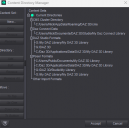
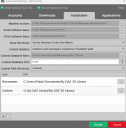
Recently moved my content library and "My DAZ3d Library" to a different drive so I could free up my main pc, I believe I linked everything up correctly. However, when I go to use a specific outfit it gives me this message "Could not find file (location of the file". The file is in the correct location but when I click on it Daz asks me if I want to save before opening and then it says it can't find it. Attahced is my content directory just so someone can check it to make sure I didn't mess up. C drive is where my previous DAZ3D Librarary was and G Is the current one. Also attached is the daz install manager since it could also be that. Daz app itself remains on C drive.

Daz 3D is part of 
Connect
DAZ Productions, Inc.
7533 S Center View Ct #4664
West Jordan, UT 84084
Licensing Agreement | Terms of Service | Privacy Policy | EULA
© 2026 Daz Productions Inc. All Rights Reserved.
Comments
Did the outfit work before the move?
Doess this happen with other assets?
What outfit is it?
What is the full text of the error, and what does the log say?
I'm pretty sure it worked prior to the move. I haven't checked every asset I have (I have alot hence the move) but so far this is the only one. The specific outfit is BW ChainSpell Ornament 01 For Genesis 9, Genesis 8, and 8.1 Females. And the full text is this in the resource error "Could not find file: /People/ Genesis 8 Female/ Clothing/ Beautyworks/ BW ChainSpell Ornament 01/ BW CSO01 Top G8F.duf.
I have a character saved that wears the outfit and I loaded them in and it works perfectly. It's on the model with all its textures.
Where exactly on your PC is the BW CSO01 Top G8F.duf file it's looking for? (I mean the full path)
The paths you have registered in Daz studio format and Poser are not the coherent, notably there's a "G:/Daz 3D" path in DS directories while Poser directories have a subfolder of it, and the default "public documents" path is not listed in DS directories. Depending on where the content is actually installed that could cause problems.
What file are you clicking on that produces this error?
I checked the files for this product, and none of them would produce the "do you want to save" or the "cannot find" error when i clicked on them, or reviewed the code.
I use a custom install myself, and the path(R:\G8F\Clothes\Fetish\Bw ChainSpell Ornament 01 G8) is nowhere near the original and works just fine for me.
Since you're able to get the product to load otherwise, my best guess at a solution, would be to reinstall the offending file from the zip, if you're clicking on the original file that is.