Genesis 9 Eyes rigging

Hey everyone, how's it going? I'd like to ask for some help. I've been doing some morphing in Blender, and I've noticed these gaps in the corners of the eyes. I'm wondering if you need Morphs corrective products, or something else. I already have some products from other stores besides Daz. And I wanted to ask how to resolve this as a Daz Studio artist. Sorry for the bad English.
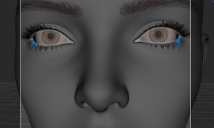
Screenshot_1.png
1018 x 608 - 268K

Daz 3D is part of 
Connect
DAZ Productions, Inc.
7533 S Center View Ct #4664
West Jordan, UT 84084
Licensing Agreement | Terms of Service | Privacy Policy | EULA
© 2026 Daz Productions Inc. All Rights Reserved.
Comments
I am assuming you have created a face morph in Blender.
1. First, select the G9 eyes, and go to Edit > Figure >"Clear Generated Morphs" to ensure the autogenerated morphs on the G9 Eyes figure are refreshed.
2. With the Face Morph dialled to 100%, export the G9 Eyes figure by itself at Base Resolution and then bring them to Blenderr. Position them in Blender so they fit your Face Morph. Export back out the eyes.
3. Load the Eye corrective position via Morph Load Pro on the G9 Eyes (the name of the morph needs to be the exact same as the auto-generated morph on the eyes in order to replace it, and it needs to be loaded using "Reverse Deformations" and "Deltas Only"
4. If you still need to adjust the eye lid morph on your Face Morph to fix those gaps on the eyes, do it in Blender. Then export and update the Face Morph in Daz.
After you have loaded the Face Morph and the Eyes to exactly where they need to be, you need to update the skeleton bones and link them to your new morph.
Run Adjust Rigging to Shape on the Face Morph (in the popup you need to uncheck all, and check only the Neck and all the Head bones, except you also need to uncheck the 2 x Eye bones and 4 x Eyelid bones).
Then use ERC Freeze to link these bone position changes to the Face Morph.
Then you need to run the Adjust Eye Rigging utility in the G9 utilities, which updates the bones for the 2 eyes and 4 eyelids, and ERC Freezes them.
Save out each of the Face Morph AND the Eye morph to your content library.
Im sure there is a video on youtube showing how to do all this. Look up "Genesis 9 Eyes" on youtube. But it might not include all of what I wrote.
Thank you so much for your tips, they were very helpful. I hadn't been able to create a character for weeks because of this problem. I managed to solve it.