Lanna for Genesis 8 not properly installing
 nicholasramirez1216
Posts: 31
nicholasramirez1216
Posts: 31
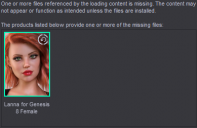
I've had Lanna for Genesis 8 installed for a while now. I've got a render queue with a bunch of pictures set up and as I go to render them I get his notification. I've uninstalled and reinstalled the file a few times but each time I try to open up another scene within the set of photos I get this notification. I don't think that any of models even feature this figure but is there something here I'm missing? I've gone into the "My Library" and when I check the texture folder the folder isn't even there. Anyone know how to fix this?

Daz 3D is part of 
Connect
DAZ Productions, Inc.
7533 S Center View Ct #4664
West Jordan, UT 84084
Licensing Agreement | Terms of Service | Privacy Policy | EULA
© 2026 Daz Productions Inc. All Rights Reserved.
Comments
How are you installing?
So I'm using DAZ Install Manager. Anytime I do install from there it still gives me that notification and the product in "smart content" has a little "update" button underneath the picture
What happens if you inside Daz Studio in Product view right-click on her icon. Can you then select uninstall?
Yes I can. There's an option for uninstall there
Also when I click the "install update" option nothing happens and the "update" button remains under the picture of the product
That there is an uninstall option, means that the database consider it installed with Connect (inside Daz Studio), and if so you will have the product installed twice in two different locations, and the Connect install will take priority.
But my guess is that the Connect install is faulty, and that is why the character fails.
So you can try to uninstall and reinstall with Connect, or uninstall with Connect, see if it then works (restart Daz Studio first).
My recommendation is not to mix installations unless you actually know what you are doing, and what is installed with which method.