Toolbar gone berserk
 belard
Posts: 56
belard
Posts: 56
Hi. I usually don't nag other people with my tech problems, but this one has me baffled. I've been searching everywhere for a fix and got nowhere.
Suddenly my top toolbar (the one with File, Edit, Create, Tools, etc.) stopped working in some of the sections - V3Digitimes, Scripts and Favorites. The names are there but when I click on them nothing happens - the submenus don't drop down.
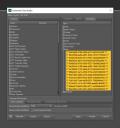
Trying to get into the Configuration (F3) showed me the attached result, which I hope will point to the problem for more technical users.
I've been a daily DAZ Studio user for... more than 10 years, I guess, and never been this frustrated.
Any help will be tremendously appreciated.

Daz 3D is part of 
Connect
DAZ Productions, Inc.
7533 S Center View Ct #4664
West Jordan, UT 84084
Licensing Agreement | Terms of Service | Privacy Policy | EULA
© 2026 Daz Productions Inc. All Rights Reserved.
Comments
File, Edit, Tools etc. are the emnu bar not a toolbar (that is the thing with buttons).
Those odd character strings mean that the Custom Action file is no longer where it was - custom actions are about the only place that DS uses absolute paths - so all you see is the GUID string assigned to the action and used to record its location in toolbars and menus. Find the action in the Custom list on the left, right-click>Edit Custom Action... and use the ... button to corect the filename, or move the action back where it was.
Thank you very much, Richard! I stand corrected on terminology and will try to use your instructions to restore things...
If the content is on an external drive make sure the system hasn't chnaged the drive letter used.