Sudden Genesis 9 issue!!!
 ArtByMel
Posts: 35
ArtByMel
Posts: 35
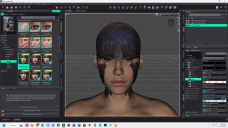
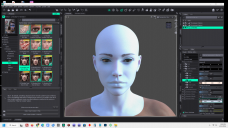
I'm not sure if this is the right place to post this. Apologies if it is not. I have a number of G9 characters as well as G8, 8.1 and 3. I have not had any issues with any of them until now. Ever since I re-installed DS recently, I've run into an issue with G9 and L.I.E. I'm not talking about add-ons but the LIE stuff that is packaged with the actual character. These options all worked fine for me prior to this reinstall. ALL the G8, 8.1 and 3 work perfectly. None of the solutions I found work for my G9 models. So what do I do here? Reinstall the characters? Reinstall DAZ yet again??? This is getting to be so frustrating. I had an image finally come together in my head and bam! No you cannot use that. I mean this is ALL my G9 characters that this is happening to not just one or a couple. I have no clue what the heck is going on here. See the screen shots below:

Daz 3D is part of 
Connect
DAZ Productions, Inc.
7533 S Center View Ct #4664
West Jordan, UT 84084
Licensing Agreement | Terms of Service | Privacy Policy | EULA
© 2026 Daz Productions Inc. All Rights Reserved.
Comments
Does the same issue happens with Genesis 9 Daz originals Make up (which are using LIE too) or only with the LIE from Bouddica ?
No, I did some investigating last night after posting this. I tried more items. It is happening with ANY L.I.E. application that does not have a pre-packaged geoshell. All across the board!! And this just started with the re-install I did a few weeks ago. DS was acting up, so I tried uninstalling it entirely using Revo and re-installing it. Turned out my nearly brand new external drive failed which is where I had all my Daz content installed. Bought a new, well reviewed by tech geeks external SSD made specifically for heavy use, daily use. Reiinstalled all my content on there and everything works fine. The drive works fantastically.
So to repeat, this is with ANY and ALL L.I.E. applications that do not have a prepackaged geoshell. It was NEVER an issue up until now.
And it is not toggling on the makeup channel, by chance? Could you show all the surface channels on the face? I want to see if I can detect something.
If you look at the screenshot, they should all be showing.
You've got 11 of roughly 45 channels displayed for the default boudica skin. There are, iirc, over 100 channels possible, depending on what features are enabled with PBR skin.
The closest result i could get to your problem was if the Makeup Enable channel was on, and there was nothing in the channels.
Check if that's on and turn it off and see if that solves your problem.