New Marvelous Designer update broke morph imports (geometry does not match)?
 FuzzyRabbitz
Posts: 9
FuzzyRabbitz
Posts: 9
Hello everyone,
As a part of my workflow, I've always been using Marvelous Designer to create morphs on clothing. I find that the clothing simulation has always been much more fluent and worked great. However, as of updating to the most recent version of MD, version 2026.0.189, something seems to have broken in my pipeline.
To also explain my (basic) way of doing these emulations, I always have worked as follows:
- Complete posing etc in daz, including clothing
- set back the resolution level of clothing to base
- Disable smoothing
- set back chest related parameters on the outfit to 0%
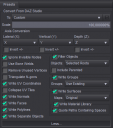
- export with attached settings (OBJ)
- export model at normal resolution level (OBJ)
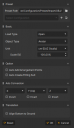
- Import model in MD with attached settings
- Import outfit part (import OBJ as garment) with attached settings
- tack outfit where needed, Simulate outfit
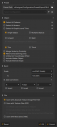
- Export with attached settings
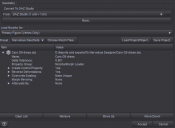
- Import back into Daz with attached settings (Morph loader pro)
I've included my export settings and import settings for reference, and to clarify, I do always set my clothing back to base resolution level. My question is if anyone else has experienced this, or if some kind of setting has been broken on my end. I'd like to ask for some advice, to see if I can get it fixed. If you spot anything wrong, or if there's some kind of extra step I'll have to (start) making, please let me know!
Thanks in advance

Daz 3D is part of 
Connect
DAZ Productions, Inc.
7533 S Center View Ct #4664
West Jordan, UT 84084
Licensing Agreement | Terms of Service | Privacy Policy | EULA
© 2026 Daz Productions Inc. All Rights Reserved.
Comments
I don't have Marvelous Designer.
Is it all clothing that fail?
If you just inport the morph as an object, what is then the imported vs the original in terms of verteces and polygons.
Yeah, all clothing failed. I compared my settings to the old version, and I might've spotted the setting that made things go wrong, seems it's no longer automatically ticked on the new 2026 version. However, I went ahead and rolled back to a previous version. With the previous version, no problem whatsoever. Pretty much the standard export settings for MD work. So for those who face the same issue; rolling back does work. Will have to see if, with the update, things break again even if i change that one setting.
I would suspect the Weld option was the culprit.
Usually someone exporting from MD to Daz would tick weld, otherwise garment would fall apart. From screenshots this hasnt been ticked.
Correct, that's a bug. More vertices are generated when exporting to OBJ with MD 2026. Bug has been reported ~~
I am having similar issues.
What I noted is that if I export from DAZ with "Write UV coordinates", I get an error using Morph Loader Pro "Vertex Count mismatch 11052:12140 (Base:Morph)", I checked that MD sees 11052 vertices in app, thus it is adding the extras during export, not during import (ofc, the count is for a specific example). It seems it is caused by how the vertices are exported with UV information...
If I uncheck "Write UV coordinates", the count remains consistent, but now MD mess up the vertex ordering, and the resulting morph from Morph Loader Pro is useless.
PS: tested with both weld and unweld in the MD export, doesn't change the resulting extras.
Yes, I could reproduce the same result. There's no such an issue with MD 2025 (by checking "Write UV Coordinates" when exporting in DS ~~), so it's a new bug in MD 2026.
We have to wait for the fix ~
I installed the latest 2025 version of MD, instead of the 2026 one, and it worked flawlessly. For the time being it is good enough for my workflow. Thank You.