dForce Ready To Wear Outfit Texture Add-On
 butterflyfish
Posts: 1,794
butterflyfish
Posts: 1,794
Is anybody else getting missing files with this product? It happens in all of the textures (hoodies, jackets, shoes and pants). I do own the base product, so that's not it.
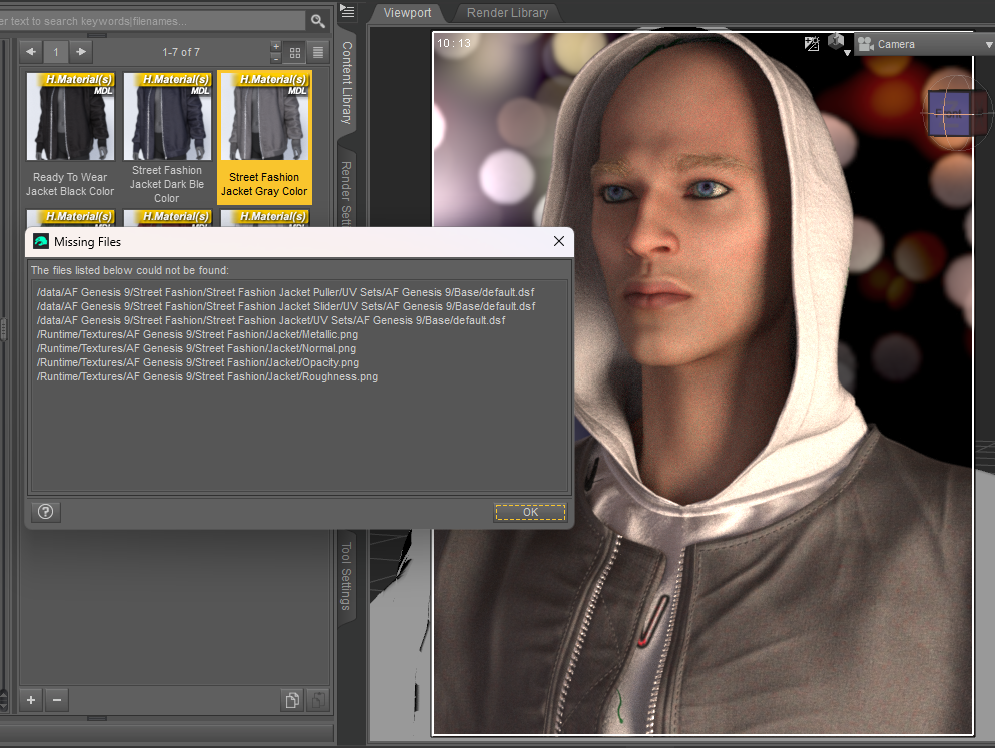
Screenshot 2026-04-07 195921.png
995 x 748 - 709K
Post edited by butterflyfish on

Daz 3D is part of 
Connect
DAZ Productions, Inc.
7533 S Center View Ct #4664
West Jordan, UT 84084
Licensing Agreement | Terms of Service | Privacy Policy | EULA
© 2026 Daz Productions Inc. All Rights Reserved.
Comments
Looks like you've got your products confused.
The errors are in relation to something called "Street Fashion", and not the Ready to wear outfit.
NEver mind it's bugged.
I'll update after a bit more analysis
--------------
Update.
Yeah these files are completely borked.
Unfortunately, there's been no update since release, so this problem either hasn't been reported enough, or it's fallen throught the cracks.
The easiest fix i can come up with is to move the add on textures from their current location(street wear) to the parent assets location(ready to wear) and edit the DUF's.
You'll need to decompress the duf's before you can edit them. The Batch Convert pane(tab) can be used to quickly convert them.
Once you've decompressed the files, you can open them in Notepad++(https://notepad-plus-plus.org/downloads/ ) all at once.
Using the Replace Tab(CTRL+F to open dialogue)replace Street%20Wear, with Ready%20To%20Wear.
be sure to save the edited files(just click the multi-save button), and back up the modified files.
I'll be lurking if you have any questions.
Thanks for confirming, and for the workaround. I guess I will report it, but I'm not hopeful that they'll do anything about it.
I kinda gave up on products getting fixed a long time ago.
Got stuff that i've literlly submitted the fix for and it never got implemented. Going on over a decade in some cases.
I just fix them myself, if i can, submit a ticket, and if i can't fix it i just get a refund.