I built a plugin for multiple DAZ instances with GPU queueing, warnings, history and GPU watchdogs
 malkom1366
Posts: 5
malkom1366
Posts: 5
Tell me if this is a tool you would use.
---
Modern creative workstations look very different than they did five years ago. The GPU is no longer a dedicated rendering resource — it's simultaneously running local AI models, upscalers, game engines, and background pipelines alongside DAZ Studio. That architectural shift has created a widening gap in user context and control that no existing tool addresses.
Render Guard fills that gap.
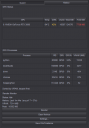
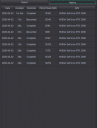
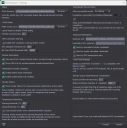
Render Guard is a DAZ Studio panel plugin that gives artists complete visibility into their GPU before, during, and after every render. Live VRAM usage, utilization, and temperature figures surface in real time. A pre-render contention check identifies competing GPU workloads and flags low headroom before a long job starts — not after it fails. Per-scene render history tracks last and average times per scene so artists can plan around their hardware rather than guess. A thermal watchdog monitors temperature throughout the render and can cancel automatically if critical thresholds are crossed.
For artists running complex multi-tool workflows, Render Guard goes further. Multi-instance coordination uses an atomic lock file queue to serialize renders across multiple simultaneous DAZ Studio windows, eliminating the VRAM conflicts that make parallel scene workflows unreliable. An open, documented signaling protocol then extends that coordination outward: any external tool on the workstation — an AI upscaler, a game engine, a render farm script — can read Render Guard's lock files and participate in GPU scheduling, turning a fragmented toolset into a properly coordinated pipeline.
Render Guard requires no internet connection, stores no data remotely, and ships with a formal integration specification so third-party tools can build against it from day one.
---
And yes, that is a New Instance button built into the pane. It does the same stuff the scripting community has written and ensures new DAZ Studio instances have all the context they need as they launch to maintain your account, pane arrangements, favorites and scripts menus, and overall look-and-feel of your primary instance.
My own use of Render Guard will involve upgrading how I render several different scenes simultaneously. I often have two scenes open, rendering one while editing poses in another, then rendering the second while tweaking the first. With this tool, now I can have even more windows open, and as they are 'done' I can click Render on each of them, assured that they will politely queue for use of the GPU and take turns one at a time. This is the core value of the tool that I conceived. Then brainstorming and looking for what the community really needs took over, and the features grew from there.
So is this good? Would you use this? What else would you like it to do?

Daz 3D is part of 
Connect
DAZ Productions, Inc.
7533 S Center View Ct #4664
West Jordan, UT 84084
Licensing Agreement | Terms of Service | Privacy Policy | EULA
© 2026 Daz Productions Inc. All Rights Reserved.
Comments
Very cool!
How does the signaling protocol work? Does it get exposed as a REST endpoint that an MCP server could communicate with for example? I could see this being part of a LLM-enabled workflow where DAZ Studio instances become "tools" for the LLM to do interesting things like test renders or rendering pipelines on behalf of scene director and a host of other things, all based on GPU availability criteria that it can evaluate if the protocol returns all the statistics in a digestible form. Lots of potential use cases.
Each DAZ instance drops a JSON lock file into a folder. The timestamps act as the queue order, and the whole thing obeys a strict algorithm that ensures polite queueing. Stale locks are detected by a configured setting so they can be disposed of appropriately by the next instance in line. If you have more than one instance waiting, the others should detect that another lock ahead of them is not stale and do nothing about it, allowing only ONE resolution to the issue.
The lock protocol and file spec is fully documented so you can feed it to an AI instance on your local machine for it to understand how to obey the same rules and create the same kind of files, building workflows that natively respect politeness rules for access to the GPU. All you have to do is make sure the config in DAZ has the same time as the time you put in your other tools.