Panel Layouts
 jmucchiello
Posts: 2,531
jmucchiello
Posts: 2,531
Is there any way to setup the screen layout so that the panels are groups as shown? Basically, I want the RIGHT panel (purplish) to always be the full height of the window and have the BOTTOM panel only be beneath the LEFT and CENTER panels. I tried modifying layouts.dsx directly. But it didn't like nested PaneGroups.
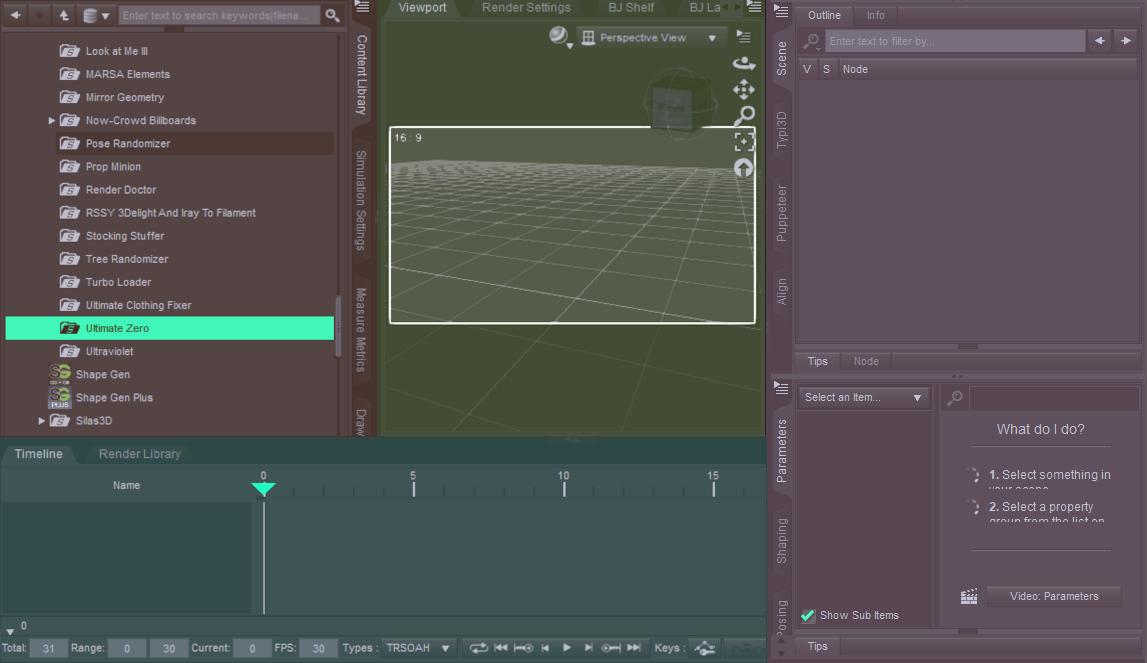
EDIT: Ooops (And as soon as I forget the attachment, cloudflare acts up)
Untitled.jpg
1147 x 663 - 298K
Post edited by jmucchiello on

Daz 3D is part of 
Connect
DAZ Productions, Inc.
7533 S Center View Ct #4664
West Jordan, UT 84084
Licensing Agreement | Terms of Service | Privacy Policy | EULA
© 2026 Daz Productions Inc. All Rights Reserved.
Comments
AFAIK, what you want isn't possible.
The closest would be to put a pane group to the right of the time line group.
The drawback, the tab orientation would be on top and not the side.
Yes, the top and botom pane wells stretch the full width of the UI - they cut off the left, right, and centre wells
That's disappointing. I don't need two full width panes. I'd prefer more than one full height pane.
If you have enough screen resolution, you can get more than one full height pane.