Twisted Easter Bunny problem
 ANGELREAPER1972
Posts: 4,885
ANGELREAPER1972
Posts: 4,885
in The Commons
apparently I've owned this product since 2024 so obviously too late to refund so was wondering if anyone has recently used JoLab1985 Twisted Easter Bunny product, wondering if it is no longer compatible with current studio or something else. My problem is it looks fine when viewing and all skins look ok but when rendered the texture is completely black
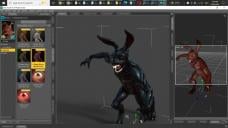
twisted easter bunny.jpg
1920 x 1080 - 710K

Daz 3D is part of 
Connect
DAZ Productions, Inc.
7533 S Center View Ct #4664
West Jordan, UT 84084
Licensing Agreement | Terms of Service | Privacy Policy | EULA
© 2026 Daz Productions Inc. All Rights Reserved.
Comments
I have no idea. But the twisted bunny was released a year before IRAY support was released in Daz, so presumably, that product is using 3DLight textures.
tried using the iray uber shader on it usually works on old stuff
What shader does it use? (you can see that in the surfaces tab)
I can't seem to see find that
In the surfaces tab select one of the surfaces which renders black and look at the top of the "editor" section, you should see the name of the base shader used:
shader - omUberSurface (RSL)
so selected the skin and again tried the Iray Uber and in the info says it is now Iray but still renders black
That's indeed a 3DL shader. It's one of the base 3DL shaders which is usually automatically converted by Iray when you render, not a custom one, but maybe there are some settings which didn't auto-convert properly.
edit: I just checked the file list in the readme and noticed that it uses some normal maps in .tif format. IIRC recent version of Iray don't like some .tif files, so maybe that's what causing a problem? I would try converting those to png or high quality jpg and replacing the normal maps in the surface settings.
Ah, one of my early favourites. It uses the omUberSurface shader, which apparently does not always auto-convert to Iray very well. In this case the main problem is the Subsurface Active mode. Turn it off and you get a properly coloured Bunny, if a little glossy, but I can't figure out the eyes, which stay black. A few adjustments will be needed if you want to continue down that path.
Otherwise, you will have to convert it explicitly to Iray (I used the RSSY 3Delight to Iray Converter, but any other should do the job). A few tweaks will be needed, like adding the alpha map to the eye opacity (otherwise you can't see the irises), maybe tone down the teeth, too.
I think the Tiff issue was fixed, though I wouldn't swear to it.
thanks Leana and Northof45
well I looked at the textures via the surface tab and they were already jpeg
next tried that convertor forgot I had that took a while to find it cause like so many other stuff in studio was installed but not installed so had to unistall reinstall again within studio like with so many products AND IT WORKED THANK YOU though if I swap skins I gotta redo the convertion each time not working on eyes just white and since it is a standalone eye textures from other models don't work but I used some gore shaders and they looked cool and looked right. teeth are white like all creatures which is fine but using some bone shaders get some nice colouring and realism pity nails are part of skin texture anyway thanks again
Glad it worked out.
Note: The eyes are all white because the alpha map doesn't get carried over when converting to Iray, hiding the irises and pupils. Just add "Eyes_Alpha.jpg" to the Cutout Opacity channel to get the original eye texture.
Yes, the fingernails are a bit clean for a ravaging beast, but you could paint something directly onto the bitmap to grunge them up a bit.
You can always save a new character preset and materials preset for later use once you have a configuration you like.
that worked for the eyes thanks now I just gotta try not to forget all this though I've saved the thread and guess it'll always be in my disscussions section hopefully :)
have you redownloaded in case the tiff was fixed?
I also just apply Iray Uber and tweak settings no fancy script needed
though I do have them
don't own this product
yep redownloaded via dim couldn't instudio didn't even have unistall option and updating metadata did nothing either but what NorthOf45 suggested worked. On side note I often come across something in smarty that hasn't installed properly and gotta unistall reinstall sometimes several times either by dim or in studio if it has that option even newer stuff gets annoying at times
DIM is always my first install choice just when I'm working on a project and sometimes click on something to add to the scene project to find out it isn't fully installed get the popup do you want to safe this scene before starting new one or no menu loads of the product and sometimes only a greyed out thumbnail appears such as today I picked up a new relaese freebie car
I like the 3dl version. No matter, it still renders black in Iray in 4.24 for me. I tried the Iray base shader, ignoring the surface's black bunny. Black with a reddish tint.