Daz horse 2 lCannonHind Distorted
 Radkres
Posts: 53
Radkres
Posts: 53
in The Commons
Hello I Have Uninstalled and Reinstalled Daz Horse 2 Yet the lCannonHind is withered Anyidea What is going on?
Daz horse 2 lCannonHind on the Base figure has it without any Add ons o.O
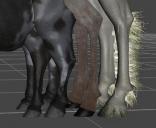
lCannonHind Distortred 01.jpg
454 x 372 - 137K

Daz 3D is part of 
Connect
DAZ Productions, Inc.
7533 S Center View Ct #4664
West Jordan, UT 84084
Licensing Agreement | Terms of Service | Privacy Policy | EULA
© 2026 Daz Productions Inc. All Rights Reserved.
Comments
Do you by chance have the zombie horse installed?
https://www.daz3d.com/m3d-zombie-horse-for-daz-horse-2?srsltid=AfmBOooQKc5ARxkEU8KG-h78k0QHk-e0NZXYon4Y4ty_bjBZ-Rri1jog
This is a known issue with this product. Despite Matari having submitted a fix, either the "fix" didn't correct the problem, or Daz has not updated the proper fix. I still have this issue regardless.
Here is a thread discussing the issue: https://www.daz3d.com/forums/discussion/comment/9381731/#Comment_9381731
Ah Thanks Will uninstall Zombie Horse!
Typically you don't have to uninstall the offending figure, unless you have no intention of never using it of course. When I've run into this issue, which is quite irritating, I go to look at the currently active/applied morphs (or whatever it's called - it's not hard to find, it's just a filter) and set those to 0%, then save the character or persona preset to save myself the heartache the next time I use a particular figure. Doesn't stop it from being annoying though.
I have yet to find the active applied morph filter. I did find one marked zero with an option for zero figure shape, and I used that. It offers a warning that I might want restore instead, but I went with zero and that worked. Whatever the issue is with the zombie horse, it's still there!
You usually want to unhide hidden morphs before you filter by active morphs, as these issues are often cased by flakey JCM's or other hidden morphs.
I leave hidden visible all the time. I just have no idea how to do the filtering. No matter. If I were motivated, I would look it up.
The errant morph is "M3DZH Leg Bag Left Bone 02" on "DAZ Horse 2" Parameters, in file "M3DZH Leg Bag Left Bone 01.dsf"
or
"M3DZH Leg Back Left Bone 01" on "M32DZH Horse" on M3D Horse for Daz Horse 2, in file "M3DZH Leg Back Left Bone 01.dsf"
or (like DAZ Horse 2)
M3DZH Leg Bag Left Bone 02" on "M32DZH Zombie Horse [01-07]" Parameters, in file "M3DZH Leg Bag Left Bone 01.dsf"
Tha node names and label names never seem to match up.
Ok. Now that I know I'm lucky enough to have at least two items that have morph weirdness, how does one actually fix the problem on the Daz horse so that it doesn't crop up every time the horse is loaded?
What I did was to modify two files:
1) "M32DZH Horse", line 56401 to change "Current Value" from 1 to 0. That will take care of the base Zombie horse.
2) "M3DZH Leg Back Left Bone 01.dsf", line 32 to change "Current Value" from 1 to 0. That will take care of DAZ Horse 2.
Now that the morph is corrected, the Zombie Horses 01-07 will not have the emaciated lower left leg, since it was set to 1 by default with the original morph, and is not set in the actor's .duf file. So, either add a new modifier to the Zombie Horses 01-07, or set the value on the morph and save over the character presets (don't update modified assets, or it will overwrite the morph file, and we'll be back where we started).
I hope that makes sense.
ETA: Note that the Zombie Horse shaping presets all work properly on the base Horse.
@NorthOf45 yes, thanks. It makes sense. What programs are good for opening and editing .duf files?
They are compressed by default, so uncompress them in Studio with the Batch Convert tab (done in place, drag-n-drop capable), then any text editor that can handle 2 MB files will do. I use Notepad++ (64-bit) for all my editing. If you really want to dive in, there is an older utility, DSON Editor from Dimension3D, that is still good, as long as DAZ keeps the DSON format.
Thanks again! I have Notepad++, so I'll give that a go.
@NorthOf45 And that did the trick! Cheers to you!