DAZ not using GPU (solved)
 dustinasche
Posts: 1
dustinasche
Posts: 1
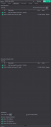
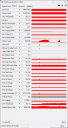
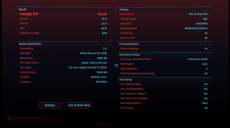
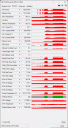
Hey all, my DAZ3D client started acting real wonky a couple of days ago, right around when the newest Nvidia driver shipped. Viewport slowed to a crawl, even when in texture shaded mode, and displayed weirdly wrong lighting in Filament mode. Rendering would cause consistent crashes to desktop. I switched to the Studio version of the Nvidia drivers and that seemed to fix the crashes, but not the performance, and renders were still taking way longer to process than it seemed like they should. I rolled back to the previous (591.74) version of the Studio drivers, still wonky. I even tried a full clean install of Windows and that didn't help. Downloaded and fired up GPU-Z to take a look under the hood and, lo and behold, it seems DAZ isn't even using my GPU for some reason. Attached is a screenshot of my render hardware settings, and one of GPU-Z showing when I initiated the render: a momentary spike in the GPU load then it falls off to idle in the 1-3% range. I did a quick stress test using the Cyberpunk 2077 benchmark on Raytracing Ultra just to make sure it wasn't my video card dying and, well, see the results below in the other two screenshots. So my GPU is working fine, and near as I can tell nothing in DAZ changed that should be causing the problems I'm experiencing. I'm basically using default settings and near as I can DAZ should be using my GPU in rendering, but just isn't. I'm at a complete loss for how to fix this problem, and I'm getting no work done. Any help or suggestions would be appreciated.

Daz 3D is part of 
Connect
DAZ Productions, Inc.
7533 S Center View Ct #4664
West Jordan, UT 84084
Licensing Agreement | Terms of Service | Privacy Policy | EULA
© 2026 Daz Productions Inc. All Rights Reserved.
Comments
How are you testing? What about a simple scene with a sphere primitive?
You're first GPU-z image shows you're exceeding the vram of the gpu. That's why you have a max out spike,then it drops back down.
Turn off CPU in hardware, as this will just kill your render performance, and turn off CPU fall back, so you can know when you're scene exceeds the vram of your gpu.
Even if CPU is checked, GPU load in GPU-Z should be at least around 98%~99% ...
Can you test a render and attach you DS log ?
Wait, so if I exceed the vram of my GPU, it just won't use the GPU at all? Like, obviously I figured it would slow things down, but bypassing it entirely is just dumb.
Ugh, I hate that it was something so simple, but yeah, that fixed the issue.
That's correct,Iray doesn't support "Out of Core" rendering.
While it may seem "dumb" it's not.
Out of core rendering can impose a massive performance hit to render speed. In some cases, it can get so bad you might as well just be using the cpu.