Importing and applying morph from blender causes the entire figure to rotate 90 degrees on axis
 hghtoto
Posts: 1
hghtoto
Posts: 1
Exporting a figure to blender as an OBJ file to edit the moprh. It exports fine, in the correct orientation.
But when importing the morph back and aplying it, it rotates the model 90 on the axis. I didnt have any issues before, I did mess around a while back with rotation limits ect, but not sure why this is happening.
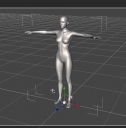
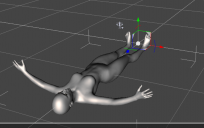
I have attacthed an iamage of a figure before morph is applied. Then rotation that happend when morph is applied to 100%,
Any ideas why this is happening? it worked fine for a long time. I did mess around a while back with rotation limits ect, there was an issue with the export obj setting with my axis conversion being set wrong , but I fixed it and exporterd a new morph and imprting it back does the same thing.
Thanks in advance.

Daz 3D is part of 
Connect
DAZ Productions, Inc.
7533 S Center View Ct #4664
West Jordan, UT 84084
Licensing Agreement | Terms of Service | Privacy Policy | EULA
© 2026 Daz Productions Inc. All Rights Reserved.
Comments
Did you use the Blender preset for both exporting the OBJ and importing the morph? Did the Blender Import/Export leave all settings of the mesh alone? Somewhere, in DS or Blender, the X/Y axes are being swapped and possibly inverted but then the reverse step isn't being applied.
Check and make sure Forward Axis is set to -Z and Up Axis is set to Y when exporting OBJ ~~
You may refer to the workflow and settings in this post : https://www.daz3d.com/forums/discussion/comment/8773366/#Comment_8773366
Thank you both for the suggestions to the both of you.
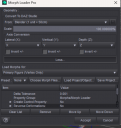
Very strangley It stops rotating if I scale it up in the morph loader for some reason... I ipmorted the morph with the blender option for geometry. If I leave the scaling at the default it imprts the morph and when I apply it it rotates, often through its self, (turning inside out to a 90 degree angle) but if I up the scale to 1000% and in the morph loader and apply it, its fine and applies the morph correclty without the model transforming axis. very strange...
any ideas why this is the case? I alway export on "to blender settings" and import back to daz "from blender" settings. I have never had this issue before. but better than nothing I guess.
EDIT: My bad I realised for some reason the X Y Z axis conversion keeps defaulting to a setting where Z and Y are swapped everytime I load DAZ. not sure why it does it but I found the issue. Thank you.
This is why you want to use the same preset, Daz then reverses the chnages made on export when it imports. Otherwise you are having to manually set the topions to invert any effect. You also need to make sure that Blender is similarly not making any changes on import unless it reverses them on export.