Need Help From DAZ to Blender and Back!
 fayke-1
Posts: 0
fayke-1
Posts: 0
Despite the positive seeming title this is more of a call for help, I recently got into DAZ on the side and holy smokes is it an exercise in patience! :)
This was probably asked and answered multiple times, sorry if this is the wrong place for the topic I don't normally do forum stuff.
Currently for practice I'm trying to take the genesis 8 female base mesh into Blender so I can remove the ear and replace it with a flat surface, like an alien head or something.
Using diffeomorphic, got mesh into blender. So far so good > Select loop around ear and hide it, press L on the ear itself to select the whole ear, press alt+h to unhide the loop i hid earlier and deselect the loop > Delete ear > Create polygons in new hole to make a flat surface > Smooth the area little by little in sculpt mode so it's flat but still organic > Unwrap uv's > Rescale/Realign/Reposition UV island over ear UV to blend texture > Export/Import to DAZ > Apply PBR Skin shader > Try to apply literally any material > Doesn't work? Mesh stays white > Manually apply textures to face, body, arms, it works > try to apply skin material again > Fail, you suck, terrible artist, go work at mcdonalds.
So... where did I go wrong?
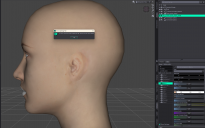
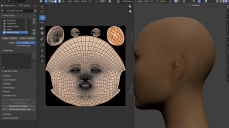
I attached an image from DAZ to show the skin "working" and also the error message that comes up when I try to apply a skin material and the other image is the UV's in blender. I'm not worried about the visible seam although it lined up and blends kinda nice without playing with the vertices tooooo much. My issue is when I try to apply materials or assets... computa says no. Any help with this, or any general tips for DAZ that will cause less ulcers moving forward would be fan-fricken-tastic!

Daz 3D is part of 
Connect
DAZ Productions, Inc.
7533 S Center View Ct #4664
West Jordan, UT 84084
Licensing Agreement | Terms of Service | Privacy Policy | EULA
© 2026 Daz Productions Inc. All Rights Reserved.
Comments
In Blender are the UVs actually applied to the model or are they a modifier?
In DS, are you using a Materials preset or a Hierarchiical Materials preset? The latter won't automatically aply to new items parented to the figure.
In Blender, Materials are just that: textures. The UVs are completely separate and part of the mesh.
But materials in DAZ Studio can come with UVs as part of the material.
That error you get is the one you get when the vertex count does not match what the UV set expects.
Probably because you deleted the ear and filled in the loop. Instead try selecting the ear like you did, inverting the selection, making a sculpt mask from that, and flattening the ear away in sculpt mode. This keeps the vertex order the same and is non-destructive to boot.
Give that a try.
Another Suggestion, because by your Surface Tab in the first image it looks like while importing your new .obj it changed the TRUE name of the surfaces, So with your Rigged Gen8F_Mesh_NoEars_16369 Open Geometry Editor and scroll down to Surfaces and REMOVE all the -1 and -2 from the Surfaces, So that you have Arms, Cornea, Ears, etc.... and then try applying your material again and it will work.
Because you imported OBJ as a new figure into DS and the figure has a wrong Node Name ... then Mat. Presets cannot apply.
Change its Node Name to Genesis8Female or Genesis8_1Female via Edit > Figure > Scene Identification... Correct Surface names with Geometry Editor, then Material Presets will work. However, since you recreated a new surface for ears but didn't recreate / imported any new UV Set for the Ears surface, you're not able to get correct textures on earless area...
I don't understand why you did the work in such a way of creating new ear surfaces... this way would be pretty cumbersome even if you want to make a another standalone "G8F figure" ~~
Instead, to make a G8 earless, you just need to sculpt its Mesh (in Base Resolution) with Smooth brush + a Mask + Symmetry mode, then import its OBJ as an Earless morph. (ss1)
Edit: To remove texture of ears if needed, you can retouch Face texture map in Ps, Affinity or GIMP with Healing Brush or sth. similar, then assign the map to Ears surface.
I don't know how to quote multiple comments in one reply and i'm not going to have much DAZ time today so i'll just reply normally, sorry for wall of text ill try to be clean about it lol
@Richard Haseltine:
"or are they a modifier" I dont have any modifiers on the mesh I copied the main genesis 8 mesh and deleted the rig and modifiers (Suggested by a different forum, figure setup applies the rig from genesis 8 when imported back to DAZ unless I misunderstood). I unwrapped the new poly's and scaled/moved them to where the deleted polys were in the UV layout, on a second or third attempt I exported the UV's and manually imported them to DAZ but that didnt really make a difference the same UV's were already on the mesh it was just another step to try. That's how I always handled UV's I don't know if DAZ has another specific method for Genesis meshes lol
"Materials preset or a Hierarchiical Materials preset?" I was using Hierarchal as it was first in the list, H.mats are a DAZ specific thing and i'm still learning DAZ so this is actually one of the things where I was wrong. Thank you for pointing it out i'll take some time to research how they work
@TheMysteryIsThePoint:
"come with UVs as part of the material/That error you get is the one you get when the vertex count does not match what the UV set expects " Yes I think deleting the geometry and making my own is my issue mainly, seems to be the general consensus and as I was thinking and losing sleep over it last night the thought occured to me as well. Thanks for pointing it out and for the explanation of how to make it simpler!
@mrpenguin76:
"it looks like while importing your new .obj it changed the TRUE name of the surfaces" Sort of? I used figure setup on the mesh and that's what created those things initially when I imported the mesh the only item in the surfaces tab was the Gen8 mesh, but you're right, from my research the name changes contribute to the hierarchal mats I was trying not recognizing where to go. Probably other issues too but it's how I learn lol
@crosswind:
"I don't understand why you did the work in such a way of creating new ear surfaces... this way would be pretty cumbersome even if you want to make a another standalone "G8F figure" I work mainly in blender and unity/unreal as a game artist making environments and VFX, not people, gimme a break lol. I should point out that in my work deleting and recreating with less topology when possible is the way to go. But DAZ isn't game development so I understand I need to change my approach, thank you for pointing it out.
"Instead, to make a G8 earless, you just need to sculpt its Mesh (in Base Resolution) with Smooth brush + a Mask + Symmetry mode" Thank you for this, as stated i'm not a character artist (still learning) so this is a helpful tip!
Thank you for taking the time to reply folks, i'm sure all your replies were correct and I need to start at the beginning and change my way of thinking. For reference i've only been using DAZ for a month but my schedule only lets me get into the software a few nights a week, but I think i'm doing ok. A steep learning curve isn't enough to stop progress!
The UV sets are part of the geometry defintion, though in a separate file. The preset tells DS which to use (usually there is only one, of course, so this isn't obvious)
So I took the time off today to figure this out, smoothed the ear as suggested. Worked faster and looks good, great. Now i'm fighting with brave's AI overlook trying to figure out how to get the obj from blender back into DAZ and recognizable as a genesis 9 figure again. AI is kinda stupid at times but I think it's figured out because the only good luck is dumb luck.
I needed to use the transfer utility to copy the face groups and surfaces to the no ears mesh BUT the no ears mesh facegroups in geometry editor's tool settings had a default group with 0 faces that was leftover from before the transfer utility was used. Deleting that made the H.material work.Also should note I had to change the scene identification for the no ears mesh to match base genesis 9 figure and manually create the surfaces (maybe not but i did this before using transfer utility so i'll mark it down just in case) using geometry editor.
This has been extremely frustrating and made me question my own existence and sanity, so hopefully this post helps some other newbie save themselves some time. Thanks for the info and for taking the time to read my frustrated word vomit.
Transfer Utility is for creating new figures, which then won't be Genesis 9 at all - or will overwrite Genesis 9, breaking other Genesis 9 content and being overwritten if there is an update. A morph is an option, another option is a GeoGraft (which sounds to be your original goal, judging by the steps you gave). A morph will do for many siituations, but a geoGraft lets you rework the mesh entirely (even adding more resolution inside the borders).
You just need to make a G9 figure earless by using a Morph, so as barbult said, you should've imported OBJ as a morph by using Morph Loader Pro rather than Transfer Utility (TU is mostly used for rigging conformers ~~ ), just like the 2nd screenshot I showed you above.
Then export the figure to Unity / UE as a game asset (direct export / import or by using Daz to Unity / Daz to Unreal bridges....). Or maybe you want to decimate its mesh in Blender or by using https://www.daz3d.com/decimator-for-daz-studio