Glute - Thigh separation unnatural at thigh bend - Genesis 8 Female [SOLVED]
 anepher
Posts: 159
anepher
Posts: 159
I'm experiencing this issue where at thigh bend the glute - thigh separation is very vissible forming an unnatural gap.
I tried to fix it with all sorts of morphs but witohut success the gap is wither softer but wider, or narrow but sharper.
Do you have any ideea how to fix this and achieve a real human bending like in the image?
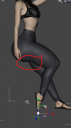
pic1.png
483 x 870 - 175K
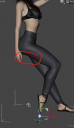
pic2.png
492 x 855 - 172K

pic3.png
803 x 932 - 413K
Post edited by anepher on

Daz 3D is part of 
Connect
DAZ Productions, Inc.
7533 S Center View Ct #4664
West Jordan, UT 84084
Licensing Agreement | Terms of Service | Privacy Policy | EULA
© 2026 Daz Productions Inc. All Rights Reserved.
Comments
Which character (generation) is that?
I have no memory of ever seeing that.
You don't have some unwanted morphs kicking in. Try in Parameters to enable 'show hidden' and click currently used.
Um first of all, you do realize that your poses and the image you're using as a reference aren't posed even close to the same, right? Very different leg placements, weight balance entirely different, even the angle of the feet is different. Second, it looks like your reference image has also been retouched a bit to give it cleaner lines, something that's quite common with "health" books and video and magazine covers. As evidence, if look you look at the complete cover I've attached, you can see that the same leg assumes a more similar shape in the the second image. Granted, nowhere near as extreme as in your samples, but a good part of that can probably be attributed to one of the morphs used, as there are some vendors who go a bit crazy with the swell of the thighs (see this image of Krashwerk's Lilly) I agree with felis that there's a good chance you've got a morph that's not behaving properly. That said, one has to keep in mind that a DAZ figure isn't made of soft tissue and muscle, it's a geometric shape that's being forced to do things by morphs and there are a good number of things that a real human can do that a DAZ figure just can't mimic perfectly. When that happens, my usual fallback is to do exactly what I suspect the photographer who did your reference image did: take it into Photoshop and fix it there.
That depends on what body morphs (character body morphs or PBMs) that you dialed on the figure. Some morphs like fantasy, hourglass, apple, baboon, esp. with big size glutes may emphasize glute creases with certain poses of thigh bend (I reproduced a similar shape like yours in below screenshot 1...)
You can fix it to some extent if you have Bend Control for G8F like the screenshot 2 ~~ or may try dial negative values in Glute Crease or reduce glute depth like the screenshot 3.
Besides, if you give the figure more thigh bend (up), the glute crease will be also reduced (screenshot 4)... like the pose in your 3rd image.
There's a morph called something like "Glutes Under Crease" which can be dialed negatively (after removing parameter limits) that may remedy this.
Thank you for the suggestion.
I think indeed is a custom morph more precisely the body morph of the custom chanracter, because I checked with a default Genesis 8 and the gap looks natural and disappears while bending.
Thank you all for your time.