Struggling with dforce collision
 panopticonseye
Posts: 0
panopticonseye
Posts: 0
Hello all! I'm very new to DAZ, and I'm using it to create realistic(-ish) reference images for my art pieces. I'm currently trying to simulate some draping fabric on a figure that's sitting/leaning on a rock, and every time I try to simulate it, it explodes about halfway through. I know it's a collision issue, but none of the troubleshooting I've tried has fixed the issue. The typical solutions I've seen seem to involve hiding elements, but I need the fabric to drape across both the figure and the rock she's sitting on at the same time, so I'm not sure if I can do that.
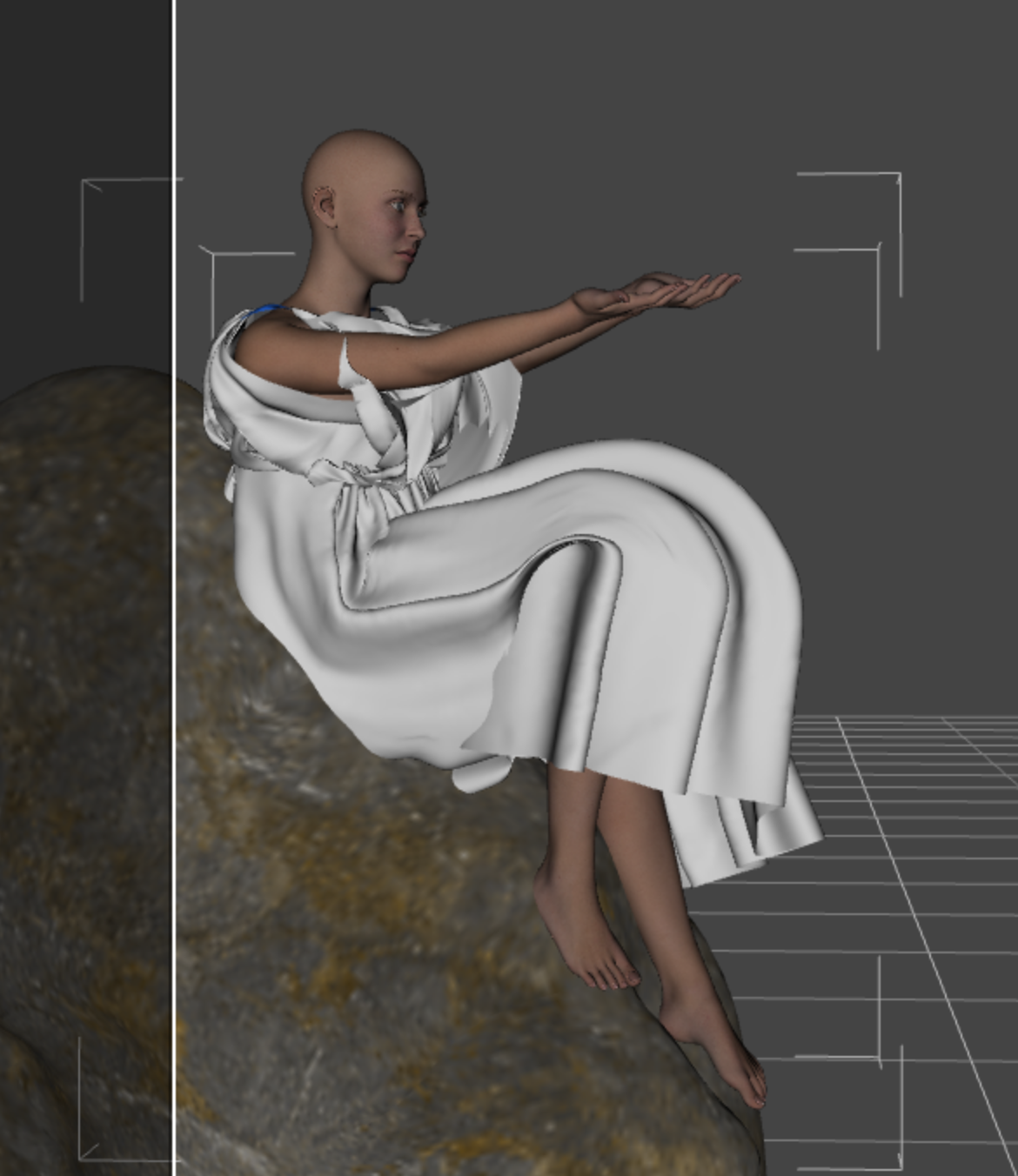
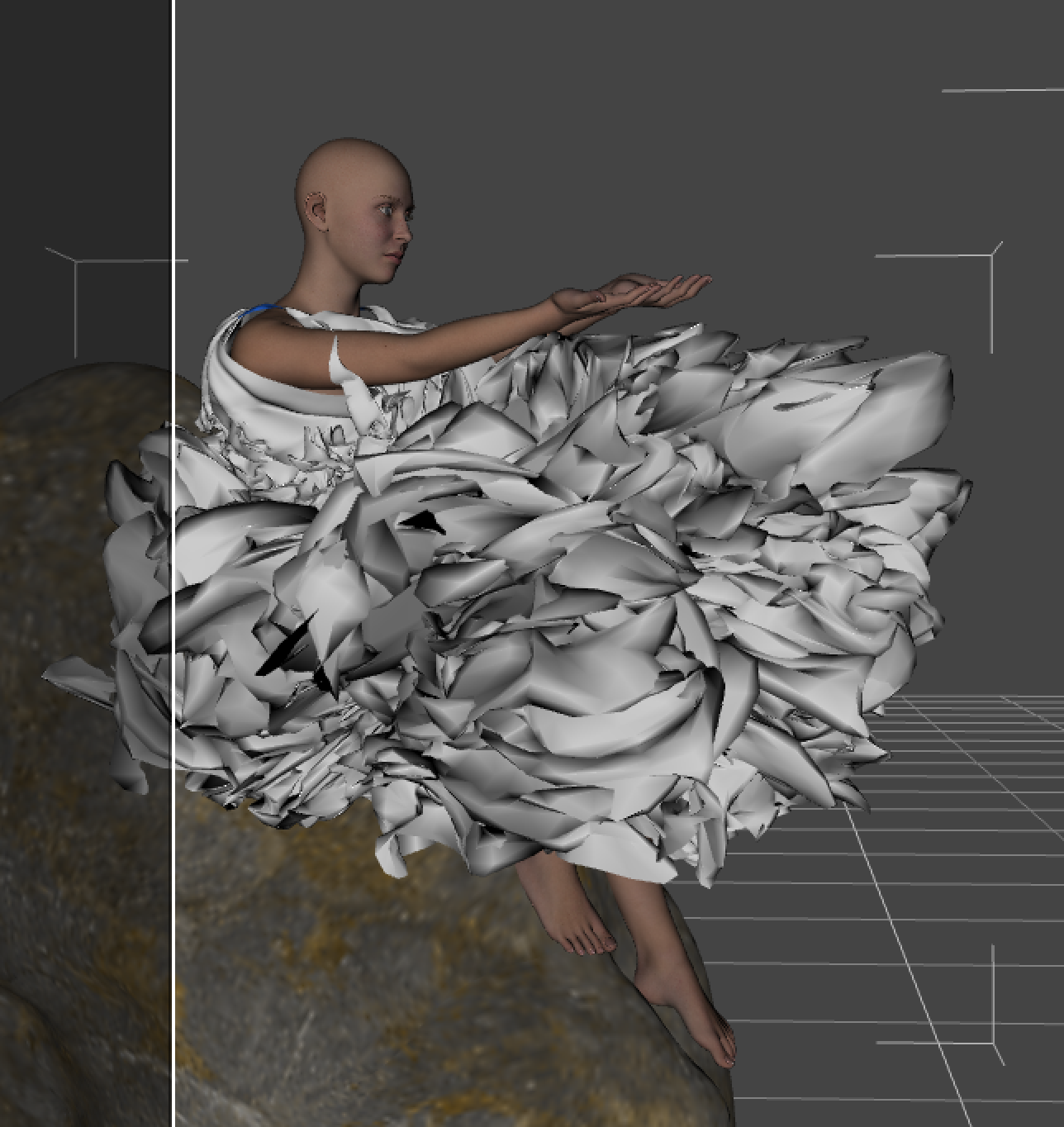
Here it is before simulation, and what typically happens.

Daz 3D is part of 
Connect
DAZ Productions, Inc.
7533 S Center View Ct #4664
West Jordan, UT 84084
Licensing Agreement | Terms of Service | Privacy Policy | EULA
© 2026 Daz Productions Inc. All Rights Reserved.
Comments
How are you simulating? If you are starting from that pose with the rock inplace them it is not surprising that it is exploding, if you are animating or using a different starting pose then one thing to check is that the separattion between figure and rock is at least twce the Dynamic Offset for the cloth (in the Surfaces pane, if there is less than that differnce then the simulation will try increasing it - but that wil usually add energy, and if it is then too close to the other surface the next step will be to move it the other way; as more and more energy is added to the sim it will eventually cause an explosion.)
I'm sort of starting from that pose; it starts from a T-pose and transitions to the end pose. I'm unfamiliar with the animation tools, so I haven't tried that yet.
What about the rock? What happens to the legs - if you start in a T then I would suspect there is a fair chnace they cross through each other, which could trap part of the outfit and cause an explosiion much the same way as in my previous post. Using the Timeline, with the rock slidiing in from behind and with an intermediary pose to stop the elgs intersecting, would probably be the best approach here.
The legs don't actually cross; here they are from the front without the fabric. I just tried the timeline method, but an explosion occurred as soon as the rock slid in. Could I be missing some kind of setting?
It looks to me as the character is clipping with the rock, and that will cause an explossion.
Have you checked that there is a gap between the character and the rock? It should default be at least 4 mm.
Moving the character away from the rock helped, but an explosion still occurs at about 84% simulation completion. I can't seem to find any other possible collisions, so now I'm just confused!
SDometimes a rapid movement can be the issue, the simulation just can't keep up with the rate at which momentum/energy is being added. You might try upping the Subframes and/ot Iteration per Subframe values in Simulation Settings.
If you're using a timeline, sometime (not always sadly) it's possible to see where the explosion started by moving the timeline cursor around the time the explosion happened.
You can also run the simulation without the rock, to see if the dress is still exploding.
I pretty much always use a 1s timeline these days; this is the same as simulating from the memorised pose but it is possible to see what goes wrong _and_ it is possible to see intersections in the intermediate frames:
Simulation settings: Use timeline, turn off "from memorized pose", i.e. turn off the initialisation. Use a 30 frame (total 31 frames) simulation.
Garment settings: Turn off smoothing. If you don't do that the smoothing can force a garment back through an obstruction. The smoothing seems to happen every frame, not sure about that.
Sub-division: I always simulate using "viewport" subdivision and I set my viewport subd for all items 1 or 2 below the final render SubD. If I get poke-through it is sometimes necessary to go to the final render SubD. Smoothing always happens at the viewport SubD, even on a render; this is nothing to do with simulation, sometimes you can do a base subd simulation and everything works, it's a property of Daz, it doesn't redo the smoothing for the render...
First step through the timeline with a naked character; all the dynamic garments invisible. Look carefully for intersections with rocks, chairs, random balloon toys, free bananas etc.
When (if) the explosion happens redo the sim and stop it during the final, non-exploded, frame. This may require several hours of careful observation; often it is necessary to terminate DAZ on an explosion. DS6 is better (a lot better) but I've still had to do it once or twice.
Having got a timeline with the explosion step around the frames before the explostion and look for the signs of intersections. Pieces of the garment will turn into curious cones which extend far beyond where the garment should be; that's the intersection that needs to be removed.
Because you are using a timeline you can move the characters limbs in entirely unbelievable ways in the intermediate frames; for dForce it doesn't matter the path you took to get here, it's the final frame that matters.
Ok, that's so much TL;DR. Just look at the first frame you posted; you can see an intersection that might have caused the problem: The piece of the bedsheet that is pointing, cone like, upwards around the characters right upper arm.