Converting dress from G9 to G8. Dress latches to arm
 Tojiro
Posts: 95
Tojiro
Posts: 95
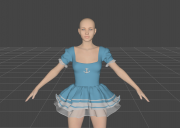
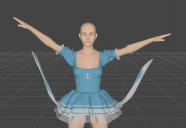
I tried using the G9 Cute Sailor Dress (https://www.daz3d.com/x-fashion-cute-sailor-dress-for-genesis-9?srsltid=AfmBOorYw_EZELrmWenMJhl6ZeYg-cQgspby-Df-Czex9-UJE4JJ8409) on base G8F. Normally dresses work fine when converted, but for this one the polygons on the side of the dress connect to her forearms, even though the forearms are nowhere near the dress when converted. So then when the forearms get moved, it creates these weird stretches like seen in in the second picture. (The first pic is base G8F in zeroed position, after dress converting) Is there any way to get around this? I've tried all the different "Types" in the conversion window...

Daz 3D is part of 
Connect
DAZ Productions, Inc.
7533 S Center View Ct #4664
West Jordan, UT 84084
Licensing Agreement | Terms of Service | Privacy Policy | EULA
© 2026 Daz Productions Inc. All Rights Reserved.
Comments
The simulation doesn't work? I tested with the Dancing Queen Dress for Genesis 9 (because I don't have the dress you're using), and while some parts of the dress were linked with the arms, hands and fingers of the character, it didn't have an impact on the simultion.
Having said that, you should be able to solve the problem using the 'Node Weight Map Brush' tool. Jay Versluis has a video on how to use this tool (not for an autofited dress, but it should give the basics on how to use it).
Your goal will be to identify which bones from the arms, hands and fingers have an influence where they should not have one and remove it using the Node Weight Map Brush tool.
Edit: I forgot, but if you're fixing the problem by fixing the weight maps, you have to save the dress as a Figure/Prop asset (File > Save > Support Assets > Figure/Prop Asset).
Thanks! I sort of got it somehow. I couldn't figure out how to delete the weights from just the dress (which caused issues on the arms/shoulders), so I ended up loading the top, leaving that default, deleting the dress polygons, making a second copy, deleting the top, then deleting all weights from the dress part. Then I had to parent her dress to the pelvis area, which is working...so far.
A quicker and better way would be that you could copy weight maps from G9 version to the auto-fitted version. https://www.daz3d.com/forums/discussion/comment/8498346/#Comment_8498346 ;
The way is the same though the case in the above thread is for G8 > G9 ~~
Or, just simply delete the bones with the weight wrongly-transferred : https://www.daz3d.com/forums/discussion/comment/9378456/#Comment_9378456
This one is going into my 'crosswind said' document before I forget about it again
Thank you Elor !