What is causing this how do I fix it?
 leo04
Posts: 414
leo04
Posts: 414
This is a M4 conversion to a G3 model, using the GenX addon. (GenX2 and GenX3) I also used the Legacy UVs for Genesis 3: Michael 4 to map the skin.
I saved a material preset of the M4 model skin, mapped tothe M4 model, to have a map to apply during the process.
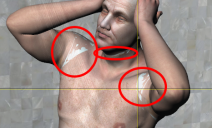
I followed the Manual to add the GeoCrafts fot the UV stuff and got the result i wanted, but after saving and re-opening the model, I am getting the GeoCraft stuff bleeding through.See image.
I would happily use another skin for a G3 model but I really need the face for the character.
Any help on how to fix this would be appreicated.
Thanks.

Daz 3D is part of 
Connect
DAZ Productions, Inc.
7533 S Center View Ct #4664
West Jordan, UT 84084
Licensing Agreement | Terms of Service | Privacy Policy | EULA
© 2026 Daz Productions Inc. All Rights Reserved.
Comments
That doesn't seem to be an UV issue.... but have you dbl-check the UV Sets on the surfaces of geo-graft in Surfaces pane ? And any geo-shell on the figure ?
Checked for what? I was able to get it to work the first time but when I opened the model again it looked like the image.
When that sort of thing happens to me it usually indicates that a texture map which was used in the original scene was not saved, so it can't be applied when you load the character again. Possibly it was overwritten with a different texture with the same name, otherwise Studio will put up a dialog box asking you to locate the missing texture.
Does the re-opened model include the geografts? And if so, have the UVs of the geografts been set to "Michael 4"?
EDIT: If you saved the figure as a Character preset it will not include the geografts. However if you save it as a Persona preset it appears it will include the geografts, complete with all material settings.
I think I figured it out. I had the Meshgrabber function clicked on. I have had this issue before but forgot about it causing an issue.
Thanks