Filament floor not showing
 dortmund3-2
Posts: 0
dortmund3-2
Posts: 0
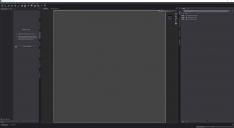
Hello, I am new to daz and I have encountered an issue with filament where I can no longer see the floor.
This only happens in filament (and Iray but I can't remember if I had ever seen the flooe in iray), I am not sure why it happened, this was working fine just 1h ago but stopped working all of a sudden, I read online that it could be a NVDIA software update but not sure. It's a shame as I really like working with Filament.
In any case I have checekd that I have shhow floor ticked, and the issue doesn't happen in oother modes such as Wire shaded. I have also restarted daz and reset my layout just to make sure. I have deleted and re created the filament draw options but no luck.
Any help would be greatly appreciated, thanks!
John


Daz 3D is part of 
Connect
DAZ Productions, Inc.
7533 S Center View Ct #4664
West Jordan, UT 84084
Licensing Agreement | Terms of Service | Privacy Policy | EULA
© 2026 Daz Productions Inc. All Rights Reserved.
Comments
The floor grid is a guide, not something that is meant to render, so this seems expected. if you want a floor then you need to add one - a plane primitive would do (Create>New Primitive).
Iray can draw a "floor" that will hide things underneath it (if it is set to a specific height, otherwise it will move to be under everything in the scene) and will catch shadows and reflections, that is set in Environemt group of settings in Render Settings>Editor by by selecting the environment Settings node in the scene and using the Parameters pane.
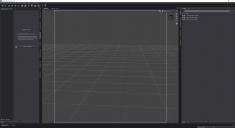
Thanks Richard, but I am 100% sure I had a floor grid when in filament mode. Here is screenshot I had taken previously from some references I had.
This grid is useful as it allows me to know where to put objects and how they are situated vs the y=0 plane. I don't want to put a a primitive (as that would not be infinite anyway) I just want the same grid as I had before and the one I see now where I am in Wireframe for example.
Do you also see a complete blank gray when you go on filament on your daz session?
You are right, the floor grid does show in Filament Drawstyle for me. I can hide it by turnign off Draw Avatars in Draw Settings>General group, so it may worth checking if you have that setting off or on.
Amazing! This worked, thank you so much man
For anyone having this problem , here is a screenshot of the solution