
Daz 3D is part of 
Connect
DAZ Productions, Inc.
7533 S Center View Ct #4664
West Jordan, UT 84084
Licensing Agreement | Terms of Service | Privacy Policy | EULA
© 2026 Daz Productions Inc. All Rights Reserved.
Comments
Thank you for the correction. I must just have newer ones of his. I know there are a few other artists' characters with the same issue, but I'd have to look them up.
Eyebrows! Not the shape options, but color options. For some hair colors, eyebrows are tricky: they're not the same color as the head hair color and they're often not the same color throughout. I suspect that I have every hair shader that Daz sells and I have experimented with Omni and everything that preceded it, and I find it tricky to get a good eyebrow color for some situations.
I bet I've already brought that up but it continues to torment me, as a I have a main character with red hair and it's hard to fine-tune a good eyebrow color that doesn't look weird on this character.
This might sound dumb, but I would like a script that copies the fingernail color to the toenails for cases that don't include toenail color.
Actually, speaking of nails, is there a G9 resource for plain, ordinary, rough nails? You know: dull, uneven,chipped a bit, slightly dirty under the nails; but not full-on, freak-show creature nails. In my case, I have a cast of characters in a frontier town who work with horses; they're not going to have nice nails - but they're also not monsters.
@SilverGirl I can see why CJ is doing his eyes differently - at least I would interpret that he's taken this approach to avoid using LIE to change eye color, as he's using makeup masks instead.
That being said, the most widespread approach for G9 eyes is either iris/pupil/sclera baked into a single texture as with older generations, or LIE as with the main Daz Genesis 9 characters and the Starter Essentials presets.
Given the limited scope, I'm not sure it would be a viable business decision for me to create a product and it's quite possible Daz would reject it on limited scope grounds anyway.
This is the dificult thing when PA's deviate from a standard approach to something - I'm certainly not saying one way is better than another, but it does make it more difficult to create supporting products that will work for as wide an audience as possible.
I know you menttioned that other PA's take this approach as well but I'm personally only aware of CJ using this technique, as such you may wish to contact him through the forums or via a Daz ticket, to see if he would be interested in creating an addon.
A quick and dirty solution (not perfect, but a step in the right direction):
Please excuse my terrible handwriting in the attached example of CJ Anya - trying to write with a mouse is pretty difficult!
@3DSaga I actually already have a nail-related script that's available: https://www.daz3d.com/omninail - whilst it doesn't copy fingers to toes or vice versa, you can set the same colors for both at the same time, or even a gradient :)
@Paula It looks like @ChangelingChick has a product designed for Genesis 9 creatures that has a chipped morph, see the last popup of this: https://www.daz3d.com/creature-nails-add-on-for-genesis-9
That could also be tricky as different products have different UV's, there's not a one size fits all approach. With respect to the fiber brows included with G9 Starter Essentials, I know they have a primary and secondary surface for mixing purposes, so you could apply a different color to each of those - was there a particular brow product you had in mind?
Your Omnihair Naturals works nicely on brows when I'm using hairs using Omnihair: what I'm usually doing is first selecting the hair colour, and then I'll apply the same preset on eyebrows. If the brows have multiple surfaces, I will apply the hair colour on the main surface, and apply a preset close to it (a darker or a lighter one depending on how the original surfaces were set) to other surfaces.
Of the top of my head, I have tested it with Beautiful Brows II and, I think, the fiber brows from Daz for Genesis 9.
@Elor thanks for the recommoendation! I was going to suggest my OmniHair Naturals but I figured I'd already plugged enough products in this thread and I didn't wan't to put anyone off :/
Hey, if you have a solution and someone has a problem and isn't aware of it, I think that's fair game!
And thank you for that tutorial, seriously. I'm still learning the mechanics of everything, and that looks clear enough to follow. Greatly, greatly appreciate that you took the time. <3
Since you asked ... LOL ... I would *really* love a product that improves the way g9 fingers/hands look when fingers are bent, clenched etc. So many improvements to realism nowadays with g9 figures, and rendering engines, materials, the improvements in hair and clothing let people who want to hit really photo-realistic images get great results - unless the figures hands are too prominently in view or focus of attention and depending on the pose. So many images that look great- until you see the fingers look like bent rubber tubes, or noodles or mannikin hands or many things other than actual realistic human hands and fingers. The wrinkles, bunches, folds, areas that stretch, the areas that tighten, the way that the sikin/tissue between joints moves in or out, there's so much nuance in real hand articulation that just isn't there. It's so limiting and annoying to have to work around that reality to minimize how poorly the hands look compared to other elements in an image by changing the pose (from what you actually want to what you can live with that improves the hand/finger appearance) or just not doing scenes that focus in on the hands closely except in "safe" poses. Okay- you get the idea by now (or maybe 100 words ago LOL). That's my #1 on improvement wishlist.
I'll second that! Eyebrow color mixing and better coloring options, def a good area for improvement. I cringe at otherwise rgeat images that have matchy-matchy hair-eyebrow colors and solid-1-color eyebrows, generally. Natural brows more often tend to have subtle variations in thickness, distribution and color. Speaking for myself, when I was alive I was very very blonde but had a mix of dark (even soft black) and many shades of blonde in my eyebrows; now as the walking undead my brows are shades of darks and greys with faded darker blondes, for example. Nothing I've seen in the store can readily capture that. Of course, I could manually pick through eyebrows and tediously recolor various starnds, but really! PS: love the new teeth product!
@genaris thank you for the suggestions - the clenched hands/bent fingers idea would have to be achieved through HD morphs, something that's currently out of my wheelhouse/comfort zone. Unfortunately due to ill health my scope for work is very limited atm so I would have to explore products that are less complex and/or that I have familiarity with, I'm sorry but hope you understand. I know Luthbellina has been releasing a lot of hd morph packs for different body areas recently, perhaps she already has something sutiable for you?
I mentioned earlier that eyebrows would be tricky to offer mixed color support for because of UV mapping differences between products.To get a natural and convincing salt n pepper or mixed color, it needs to be built into the product itself through surface zones that different colors can be applied to. The G9 Starter Essentials brows with their primary and secondary zones are a step in the right direction but unfortunately don't go far enough IMO becasue the secondary zone is only a smattering of hairs and would only be clearly visible for closeup portraits. A long time ago I was looking into creating a product not just for eyebrows but for hair too, and the results were just not good.
Sorry to hear that you're having health issues that are hampering you - I can certainly understand that from my own experiencecs. Hope you'll get through to better days. Meanwhile - I have a good number of the products that you already have in the store beyond the new teeth product and enjoy them, and look forward to whatever you do release in future!
As to matching eyebrows and other hair, there's a script on RenderHub, "Match the Drapes", by SilentGuy that works really well.
I was really impressed with this product and I think you did an awesome elegant job on an overlooked part.
@Lyoness thank you for the kind words :)
Quick-click solution for my stock G9s. Thank you for your service!
What you typed ^
What I saw ^ Somehow the c and the l in c l i c k got...really close and personal
I bought this a couple of days ago and I'm very happy with it.
Something that occurred to me while developing these teeth materials is that most smile morphs/pose controls don't adjust the positioning of the teeth, which can really throw off how the smile looks. I've come up with a script solution that allows you to easily adjust positioning of the upper and lower teeth independently, and it works for Genesis figures as far back as Genesis 3!
I'll create a separate thread and post a link to it here when available.
I used the shader on Daz Dog 8. Not bad looking.
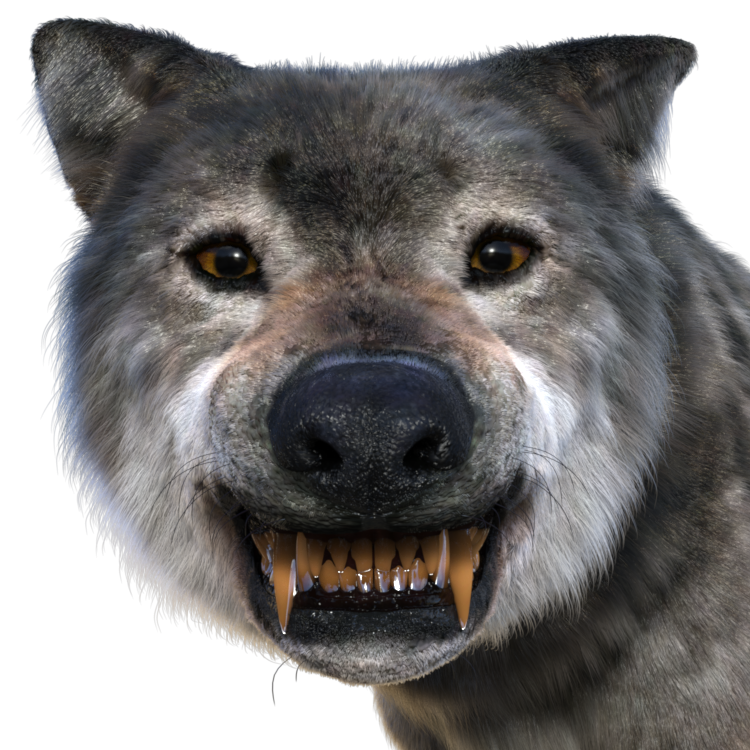
I tend to adapt shaders for Genesis to the Dog, because I do a lot of canine renders. The eye shader up there is Realistic Eyes for G9 with Dog 8 friendly maps XD
The teeth are great. I snatched them up immediately.