Unable to use create strand based hair or LMH on imported mesh
 tam_c3df5332fc
Posts: 151
tam_c3df5332fc
Posts: 151
Hey everyone,
Hopefully you can give me insight on why I am having this issue. I have downloaded a mesh from the internet and I am trying to apply hair to it, but I am unable to "paint" strand based hair
or "paint" LMH (look at my hair) to the mesh.
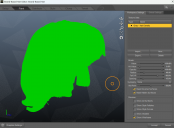
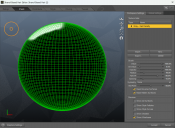
The surface appears to be different, in that, it is just a series vertices without faces like what you would see on a primative.
As you can see by the attached screenshots, the mesh does not have the squares or faces, like a basic sphere would have, and thus, I cannot "paint" any hair onto the mesh.
I have tried a few things with the mesh in Blender - added a subsurface modifier, unwrapped the UV, followed by Smart UV Project, which made the exported obj file HUGE
6,063,349 KB
Whatelse do I need to do in Blender or any program to make this mesh "paintable" for growing/making hair?
Thanks in advance


Daz 3D is part of 
Connect
DAZ Productions, Inc.
7533 S Center View Ct #4664
West Jordan, UT 84084
Licensing Agreement | Terms of Service | Privacy Policy | EULA
© 2026 Daz Productions Inc. All Rights Reserved.
Comments
Very clearly that surface is way too high poly.
Im sure it does have faces, there are just too many to visualise them.
You mean subdivision surface modifier?
Well that would just make it worse because now you have added 4 times the number of faces for every face per subdivision level.
Yes, SBH Editor needs UVs to paint on. But you need to reduce the poly count.
Personally, I dont know why you are going through all this trouble for a hair scalp. In any case, to reduce polycount you need to retopologise to lower poly mesh (or at the very least turn off the subdivision modifier). Retopologising, or deciminating, or reducing poly count, in Blender is well covered ground and I am sure if you insist on using such a haircap there will be many videos and tutorials around these topics.
Not that I am in any way endorsing that you proceed using this haircap.
Thank you for your response @UncannyValet
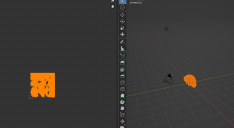
I am not wanting to use this as a haircap. I was going to use it as a guide in making my hair - see attached screenshot
I wanted to "paint" each section with hair based strands
Also, thank you for explaining that I need less of a poly count, that makes a lot of sense
EDIT: BTW, your Decimate Modifier worked perfectly - by lowering the Ratio slider to 0.01, followed by exporting the new obj -
I am now able to "paint" hair base strands - see attached screenshot
Once again, thank you @UncannyValet
It turned out pretty good. When rendering, the hair is much more thicker than I expected, but it looks great