A bug on OOT hair or my mistake? Please, help.
 Shimamura
Posts: 70
Shimamura
Posts: 70
Hello.
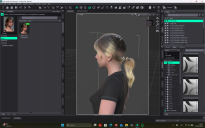
As you can see in the attached file, i have a problem with this hair. The figure is BJ Ensley for G9, the hair is dForce Strand-Based Messy Low Ponytail Hair for Genesis 9
I don't know why, but my character seems tu be bald... I tried changing sizes of both hair and head, but nothing good. I tried to use this hair with others characters, and this bug did not happen. Then i assume the problem is in the shape of the head of Ensley (but i can find a way to reshape her head...). In fact the problem is on her with all of my oot hair tested... I have to choose for my story another chararcter, change and buy new hair for her, or i can solve in some way?
Thank you for your help.

Daz 3D is part of 
Connect
DAZ Productions, Inc.
7533 S Center View Ct #4664
West Jordan, UT 84084
Licensing Agreement | Terms of Service | Privacy Policy | EULA
© 2026 Daz Productions Inc. All Rights Reserved.
Comments
Try applying a Smoothing Modifier to the hair's Cap element, Edit>Figure>Geometry, then in Parameetrs set the Collision Item to the base figure and the Smoothing Type to Generic.
Thank you. In this way i can adjust finally cranium size, but the ponytail remains bugged as in the figure. Anyway i do not want to reduce the cranium, I want the hairs fitting on the figure. If I change cranium proportion the head of the figure loose her beautiful proportions
If the hair collides with the base figure then the cranium resizing should be accomodated.
As for the ponytail, you probably need to create a morph to match the figure/head morph (which you could probably do with a dForm) to bring it back into position, and then most likely adjust the rigging to match the new position (Edit>Figure>Rigging>Adjust rigging to Shape with the tail selected should get you close).