Change Render Settings parameter settings?
 mazinkaiserzero
Posts: 220
mazinkaiserzero
Posts: 220
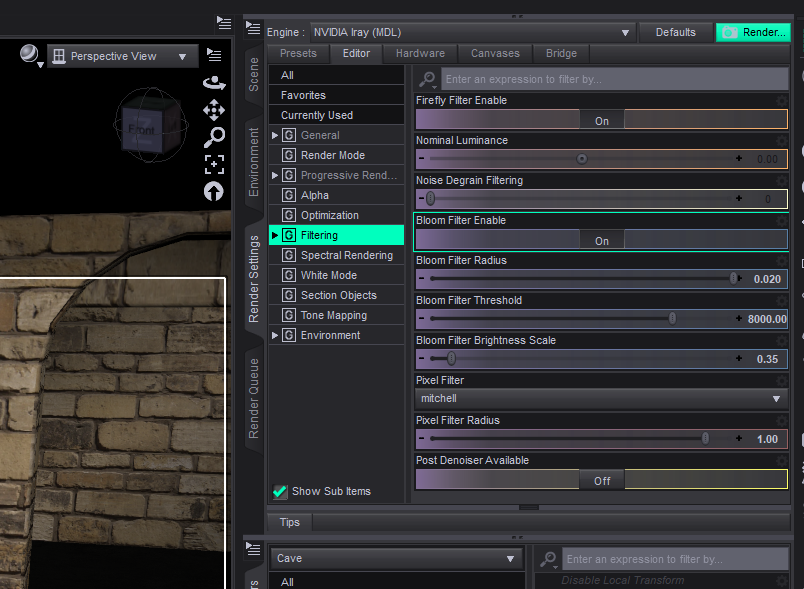
Hi, I'm having an issue with the render settings in Daz: I'm assuming at some point while creating a character some product I used must have set my Bloom Filter Radius maximum amount to 0.02. I still haven't been able to track what did it, but the real problem is that I can't find a way to set it back to the default values. The "Restore Render Settings Defaults" in Preferences doesn't do it, the Reset Value in the parameter's cogwheel menu doesn't do it, there isn't a "Parameter Settings" option like on the morphs sliders and creating a new scene doesn't fix it. The only way I can fix it is closing Daz entirely and while, yes, I can salvage the character by saving a subset scene of it, then closing Daz and loading the character in a new and clean scene, I'd like to know if there is a way to fix this without closing Daz in case I find products that mess with it again.

Daz 3D is part of 
Connect
DAZ Productions, Inc.
7533 S Center View Ct #4664
West Jordan, UT 84084
Licensing Agreement | Terms of Service | Privacy Policy | EULA
© 2026 Daz Productions Inc. All Rights Reserved.
Comments
The default is 0.05.
If you Alt-click it, doesn't it then go back to default?
Sorry, probably should have specified the problem isn't that I want to set it to default value. For that specific scene I needed to go much higher and though I already solved it by saving the character as a subset, closing Daz, loading a previous version I had of the scene without this issue and merging the character subset, I still would like to know if there is a way to fix the parameter without having to close Daz.
Have you tried clicking the gear icon, and see that it isn't locked or has a low max value?
If you click the Gear icon, can you find an action of Reset Value and/or Reset Attributes ? They should work to reset it to Default. (screenshot 1)
If you cannot find Reset actions, check this thread to resolve it. https://www.daz3d.com/forums/discussion/657011/please-help-me-new-update-stuff
Yes! Thank you! As I said, none of the reset actions worked, the issue was that Parameter Settings was missing so I couldn't just change the max value back to its default, so the info in your link worked perfectly.