Adjusting G9 Eyes

Hello!
Can someone help me please with intstuctions on how to make adjustments on G9 eyes? The attached image shows the default G9 Actor with some minimal adjustments, but the eyes and sockets are the defaults one and there is a visible gap between the eyes and socket. How can this be adjusted to fit by using the default dials? Do I need to buy morph sliders for eye adjustment?
Thanks in advance!
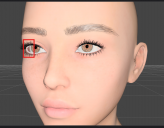
image_2026-02-19_014925307.png
1629 x 1268 - 865K

Daz 3D is part of 
Connect
DAZ Productions, Inc.
7533 S Center View Ct #4664
West Jordan, UT 84084
Licensing Agreement | Terms of Service | Privacy Policy | EULA
© 2026 Daz Productions Inc. All Rights Reserved.
Comments
In the meantime I ran some tests and realized what caused the gap...I used a full body morph on the G9 Actor and the eye got messed up (faulty morph or incomplete). Anyways, the initial question still remains - how can I fix this?
Eyeballs don't really fit well with some character morphs... that's why content creators have to fix the auto-generated head morphs on the eyeballs ~~
If you know some external software like Blender, you can easily fix the issue by exporting figure + eyeballs to Blender, make the eyeballs fit well then import them to update the head morph of eyeballs in DS....
or you can refer to this free way : https://www.renderhub.com/rendorgal/et-morphs That freebie and tutorial are not for G9, but the process works for G9. After clearing the delta morph, you need to manually tweak / rig eyeballs instead.
Thanks for the inputs Crosswind. I was almost sure someone would suggest this workaround :). I guess we just need to accept this thing as it is. However, it seems easier to just change the body morph that messed up the eyes and use a different one that fits.