Shadows and parts in sun are flipped.
 andreas.e.petersen
Posts: 0
andreas.e.petersen
Posts: 0
in New Users
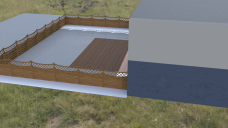
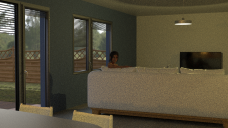
i im trying to render a simple scene from inside a house, but the shaddows outside the window look really bad. the parts that are in shadow are brighter than those that are not.
the scene is built in blender and then imported into daz, i have tried replacing the grass plate with a daz 3d plane, ive tried different textures, ive tried different hdri, but nothing has helped.
has anyone had a similar problem?
shadwoswtf.png
1920 x 1080 - 3M
almost good.png
1920 x 1080 - 5M

Daz 3D is part of 
Connect
DAZ Productions, Inc.
7533 S Center View Ct #4664
West Jordan, UT 84084
Licensing Agreement | Terms of Service | Privacy Policy | EULA
© 2026 Daz Productions Inc. All Rights Reserved.
Comments
So you get the same shadows from the fence even if they are falling onto some other mesh? The obvious suspicion is the fence itself, but I can't think how it would cause that. Does it seem correct if you do a test render in Blender?
Is everything one object?
And if not, how does it look if you just take the fence, added a primitive plane for ground, and then a HDRI or sun.
The shadows generally are whacky, where is the light coming from? It looks like the building is also casting a negative shadow.
Did this ever get solved? It looks as if light used for the sun has a negative value for its brightness (I haven't learned how to make DAZ lights yet, is setting one that way possible?). The...I'll call it concrete... looks like it might be shiny and be reflecting the fence, but it also could be shadows working like they should from the HDRI, the lighting in the house doesn't jump out to me as drasticaly wrong, just the outside where the sun might be shining from above and behind the model and to our right.