Render settings to reduce/remove moire patterns
 omvendt
Posts: 225
omvendt
Posts: 225
in The Commons
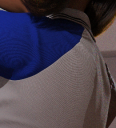
Hi, and happy Sunday. Say, do you know if there is a way to reduce the moire patterns that I get with this top? See picture, for example.
I searched the Forum archives but only found a recommendation to render at 4K then collapse to HD. Would that work?
Thanks
Deleteme.png
261 x 288 - 176K

Daz 3D is part of 
Connect
DAZ Productions, Inc.
7533 S Center View Ct #4664
West Jordan, UT 84084
Licensing Agreement | Terms of Service | Privacy Policy | EULA
© 2026 Daz Productions Inc. All Rights Reserved.
Comments
A Moire pattern happens when two repeating paterns overlap, that seems a bit large to be the pattern on the sweater and the pixel grod - are you sure it isn't just the pattern being stretched out? Does it actually go away or rescale if you render larger, or zoom in at the same render size?
Assuming you are using an NVIDIA GPU, there is a setting in the NVIDIA control panel -> Manage 3D settings -> Anisotropic Filtering that defaults to Application-controlled. I do not know if Daz Studio actually controls it, I have never seen a setting for it anywhere. Try changing it to some other value...
Optimize the settings of Pixel Filter Radius in Render Settings by keeping it > 1.25+ ... or try reducing the size of diffuse texture map to less than 2K.
Check this thread : https://www.daz3d.com/forums/discussion/695351/how-to-prevent-or-remove-moire-patterns