trouble with ultimate eyes
 ubergamer62
Posts: 28
ubergamer62
Posts: 28
I'm trying to set up eyes with ultimate eyes but despite selecting the white eyes there's still a bit of bloodshot veins in the corner instead of pure white. If I remove the texture from the base color in sclera it turns white but looks uncanny.
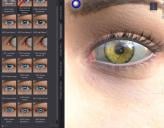
bandicam 2026-02-07 03-21-26-518.jpg
1021 x 796 - 288K

Daz 3D is part of 
Connect
DAZ Productions, Inc.
7533 S Center View Ct #4664
West Jordan, UT 84084
Licensing Agreement | Terms of Service | Privacy Policy | EULA
© 2026 Daz Productions Inc. All Rights Reserved.
Comments
In Surfaces tab, with Sclera surface selected, you may try reducing the value of Translucency Weight from 0.5 to 0.1 ~ 0.25 to make Sclera whiter.
Then if needed, you also can retouch the texture map in Base Color slot (Sclera White.jpg) to make it a bit brighter... with an Image Editor. That'll futher help.
(Back up the original Sclera White.jpg file, retouch Sclera White.jpg in Image Editor with a higher Curve value, Save. Then hit Ctrl + I in Daz Studio to refresh texture maps. You'll see the change.)
But is there any way to remove the veins? Thats kinda unrealistic for normal eyes, they only get bloodshot if you get soap in them or something, not 24/7 unless you got something medical wrong with your eyes
Its pretty normal for eyes to have veins under the surface. If you look ar your eyes as close as you are looking at your characters eyes, you will see them.
Yes, agreed with @IceDragonArt that's pretty normal ~~
If you really want to remove them, you can do it with some Image Editors like Affinity, GIMP which are totally free, carefully remove the veins from the texture map by using Inpainting Brush or Healing brush ~~ like the attached screenshot, I removed the veins in the left eye.
Yeah THAT is the kind of results i'm looking for. I know that its normal to have veins in your eyes but they're not always so....obvious. The default white looks like they got soap in their eye earlier and the eye isnt fully recovered.