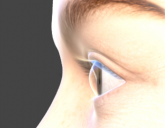
Can you tell me why eyes don't look correctly here? (image)
 AlbertGrey
Posts: 6
AlbertGrey
Posts: 6
Hi! I am a noob using Daz Studio (or trying to).
This image is from the preview, but it looks the same when using Iray or OpenGL renderings. I have an AMD GPU by the way.
As you can see, the iris lies flat on the eye and you can see a transparent gap there. This happens with everything I have tested: genesis 8 and 9 base figures, actors for those, or even the toon figures, as they come, without tweaking anything.
Can you please help me understand if eyes have to look like this in Daz or if I am doing something wrong regarding materials or rendering or something?
Should this be in the technical help section?

Daz 3D is part of 
Connect
DAZ Productions, Inc.
7533 S Center View Ct #4664
West Jordan, UT 84084
Licensing Agreement | Terms of Service | Privacy Policy | EULA
© 2026 Daz Productions Inc. All Rights Reserved.
Comments
Your image appears not to have posted.
How are you rendering - Iray? How is the scene lit?
I have tried Iray, OpenGL and preview. This image is in preview mode, with the perspective view automatic light, but I tried adding another light and it was the same.
I'm not seeing a gap, I do see an oddity with the upper eyelashes.
There are several products for Genesis 8 that add concave iris morphs and at least one for Genesis 9, though ti would be fairly easy to add a dForm targetting just the iris area (using a weight map or just carefully positioning the filed to enclose the iris mesh without clipping other parts) in order to create your own.
Is the transparent "gap" you are referring to the space between the iris/pupil and the cornea? Here's an actual medical diagram of the eye
https://www.merckmanuals.com/professional/multimedia/3dmodel/eye-anterior-and-posterior-chambers
I know the part in front of the iris is technically transparent, however various visual effects make that part of the eye look fully colored, and its absolutely imposible to clearly see the skin of the nose behind the side of the eye. In reality, it looks like this:
Can somebody confirm if their Daz figure's eyes look like mine (and it is therefore just how Daz works) or if it is actually supposed to look like in the real life photo?
Have you set the various Index of Refraction for each part of the eye? I found this can make a difference in some eyes.
http://hyperphysics.phy-astr.gsu.edu/hbase/vision/eyescal2.html#c2 ;
Chevybabe's Natural Eyes products have custom morphs try to correct this issue, but ultimately it's a case of a DAZ figure eye being a grossly simplified version what goes on in a real eye. It's all a matter of compromise in terms of what works well from most angles without bogging everything down.
Thank you. I'll take a look at those.
I haven't messed with materials or refraction yet, but I have tried different characters from diferent genesis versions so I wonder why would all come like this by default. My assumption was that I had some kind of problem, but I'm not sure.