Art Question
 mosellistudios
Posts: 76
mosellistudios
Posts: 76
in Art Studio
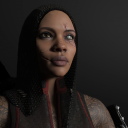
I want to create a character with a 3rd degree burn on her face. Is there any technique that I can use to only give her one eyebrow?
HELLina4.png
1000 x 1000 - 880K

Daz 3D is part of 
Connect
DAZ Productions, Inc.
7533 S Center View Ct #4664
West Jordan, UT 84084
Licensing Agreement | Terms of Service | Privacy Policy | EULA
© 2026 Daz Productions Inc. All Rights Reserved.
Comments
The first solution: doing one render with both eyebrows, then, after hidding them both, you'll only need to do a Spot Render of the area around the now hidden eyebrow, taking into account any shadow it would cast (in case you don't know: by opening the Tool Settings panel with the Spot Render tool active, you can set it to do the spot render in a new window). Then, you merge the two in Photoshop/Affinity Photo/GIMP/etc.
Biggest advantage of this technics, you don't have to modify the eyebrows, biggest drawback, it'll get old really fast to have to do the spot render.
My suggestion would be to create a conditional graft on the eyebrows: I never did it with eyebrows, but I think it should be possible because eyebrows are a figure. It should be easy to create one for the eyebrow you're planning to hide. Mada has a video on the subject, to hide sleeves on a shirt, but the principles should be the same with eyebrows.
Once done, you'll only have to activate the conditional graft you created and it will remove (temporarly) all polygons from the eyebrows, allowing you to do one render.
The biggest advantage of this solution: the eyebrows stay the same outside of having a new conditional graft and it doesn't impact the files created by the artist, it doesn't change how metadata (if any) are working and it doesn't change the folder in your Content Library.
If you're planning on hidding geometry regularly, Easy Geometry Hider by Utiltarian will take care of a lot of the boring stuff, but if you are only planning of doing it once or twice, doing it manually will work the same:
https://www.daz3d.com/easy-geometry-hider
Another possible solution, advertised by Chevybabe25 in her various brows products, could be to create a version with only one eyebrow (to be fair she's adverstising removing some part of the geometry of eyebrows, not one eyebrow completly but it should work for a whole eyebrow too). I never did it either with eyebrows and it's bit more complex than creating a conditional graft so it should be a last resort solution IMO:
At that point, the last step is, with the eyebrows selected, to go to 'File > Save As > Support Asset > Figure/Prop Asset…' and to save the eyebrows as a new eyebrows in your My Library folder.
Or just render the figure without eyebrows. Render the eyebrows seperately, merge in photoshop and just erase the second eyebrow.