How to use external hard disc to store DS 4.24 and my stuffs
 chriswongbiz
Posts: 223
chriswongbiz
Posts: 223
Hi,
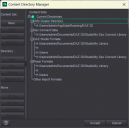
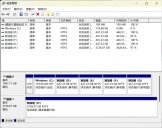
I just installed Daz Studio 4.24 in my new laptop. It has 2T, I tried using Daz Installation Manager to install all that I bought over the years into this, unfortuanately , although it has C: D: E: F: G: discs. the C: , which installation is supposed to work onto, its capacity is only about 118 GB, so I add an external hard drive which has 4T capacity, and changed everything in the DS content installation path to H: , however, IM keeps saving tons of stuffs back on C: . and very quickly the disc is full. Then IM stop downloading and installing. I thought deletely what it put into C: will free some space, but if I do it affects the functions of Daz Studio, plus, the truth is, even i cleared everthing and start from scratch many times IM installation of my things keep adding back stuffs into C: . So, can you tell me how to properly install Daz Studio on my external disc H: ( which I thought I i did ), and from now on move everything I previously owned into H:. without Installlation keep returning back to C: ? Attached pls see my installation paths, and my laptop capacities:
Chris

Daz 3D is part of 
Connect
DAZ Productions, Inc.
7533 S Center View Ct #4664
West Jordan, UT 84084
Licensing Agreement | Terms of Service | Privacy Policy | EULA
© 2026 Daz Productions Inc. All Rights Reserved.
Comments
If DIM is set to save downloads, you need to also point that to H.
And potentially also the manifest files, though they don't fill that much.
Thank you for the response. So i start all over again, i downloaded IM, ordered it to get to H: , so i do see it stored into H:, however as i checked C: , it still put Daz Studio in there, I don't understand. it will repeat the chaos if C: doesn't get out of the way. I need to use and store everything only in H: , because it is the external drive that has 4T capacity to deal with the volume of DS.
You changed the base path for software to H:? Changing the content location won't do anything.
I Dont know how to stop downloading stuffs to C: . I want Daz Studio 4.24 and everything to be downloaded to my external hard drive H: .. Daz IInstallation Manager Keep adding stuffs to C: use up my 118 GB in C: very soon and got stuck right when its full. I wont be able to use DS at al if I can't use it in H: whidh is 4T.
Pls teach me what to do?
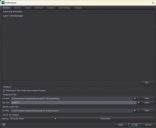
Open DIM, go to Advanced Settings, and show us a screenshot of Download and Installation tabs.
First, where do I save IM? I do not want to misplace it. Pls look at attached pic too see if this is correct to keep it in C: ?
You can install DIM whereever you like.
The listed path is the default one and DIM takes up 50 MB, so rather limited.
But if you prefer, you can set the path to H.
Here they are.
These 3 settings are for directories DIM uses internally:
You can move those on your H drive to save space, especially if you don't delete the downloads after install: if you want to do that I suggest copying the "Install Manager" folder and its subfolders to somewhere on your H drive and then modifying those 3 paths.
In the section at the bottom of the Installation tab you have the paths where DIM can install content. If you want to install the content on your H drive you will need to add the path to your library on H there (use the + at the bottom of the grid), then in the main DIM window you will be able to select that new path as install target.
So here is what I'm doing:
1)When I downloaded DIM, I have one in C: and one in H; already. (You can move those on your H drive to save space, especially if you don't delete the downloads after install: if you want to do that I suggest copying the "Install Manager" folder and its subfolders to somewhere on your H drive and then modifying those 3 paths)
2)Pls check out the screenshot,I'm going to add a new H: path. (In the section at the bottom of the Installation tab you have the paths where DIM can install content. If you want to install the content on your H drive you will need to add the path to your library on H there (use the + at the bottom of the grid)
3) BUT then, the original recommended C: path, it will still be there? because I am only going to add one H: path, but not deleting the original C: path. Would it keep storing in C: at the same time still?
After you have added a new content area, you must change Content Path Shortcut, by clicking the little triangle to the right and select your new path.
You still have software set to install to the C: drive -
How about Manifest Archive? Do I change its path to H: too?
And, am I all set after Manifest Archive to start installing DS 64 bit and DS 32 bit?
I have changed my manifest files to another drive.
You don't need the 32 bit version for general use. There are something with the 32 bit version that works better, but can't remember what that is.
Mimic whatever version?
HI, i finally did installed a lot of stuffs onto my hard drive H: , but thenn it stopped when 473 items are left ready to download. I checked and found that my laptop's C: is full again. I looked into its capacity and found that in folder users>public>documents>DAZ 3D> Omsta;;<amager>Downloads>, there are 7512downloaded items stored. I'm wondering may I safely delete all these items? (as I can download any of them again from my account anytime I want, right?) It will free my C: capacity, and at the same time continue to download for H:, is that right?
You can delete them, and will then have to redownload if needed.
But I thought you also had pointed your download folder to H?
Thank you everyone,I finally downloaded everything, daz studio 4.23 ( 64 bit ) and all my content library in my hard drive now. Then, I tried to download DS 4.23 (32 bit ) with the same method. It's installed alright, however, it can't render as it says no renderer available. So what have I missed? Any solution on this one?
Another question,I'm used to the old version DS studio 4, which I render with 3Ddelight. But now that I have moved to DS 4.23, when I render, there is no option for 3Ddelight? Ony IRAY? very slow. Is there anything I can do to make it show up for use?
The newest Daz Studio 4.24.0.4 does not have 3DL, as Daz no longer have license to distribute it.
Though 4.23 should have.
Ah so what I have is actually 4.24, you're right! So where can I download version DS 4.23 ?
You can't. Daz doesn't offer to download older versions.
and doesn't have the right to distribute 3Delight, so even if they did in gernal offer older versions they would no longer be able to do so for that reason
I have just recently been getting back into poking at Daz for a variety of things, and was a bit surprised by the loss of 3Ddelight. It does appear that the "real time" renderer provided by Filament can be enhanced a bit using various tricks and might be suitable for your needs depending on where they fall. While it won't give the same results as you get from an IRAY render, it is very fast to get the results. The biggest learning curve seems to be dealing with shadows within Filament, though there are plenty of impressive examples once you get past that challenge.