How much faster is it to render an image in Daz Studio if you have two GPUs?
 omvendt
Posts: 222
omvendt
Posts: 222
Hi!
I thought about getting an additional video card and was hoping one of you had done this before me.
My question to the Daz hive mind is, if you run two (identical) RTX40xxs in parallel, in the same desktop, what is the performance boost? I understand that the VRAM is not added but the cores are.
There must be a penalty for coordination, however. Back in the SLI days, two cards were just 30% faster than one card, I think, when gaming.
Anyone w real-world experience?
Thanks!

Daz 3D is part of 
Connect
DAZ Productions, Inc.
7533 S Center View Ct #4664
West Jordan, UT 84084
Licensing Agreement | Terms of Service | Privacy Policy | EULA
© 2026 Daz Productions Inc. All Rights Reserved.
Comments
I paid less than the 3.5K (mariginally) for a whole new system with Nvidia GrForce RTX 5060Ti card with 16 GB of RAM. Intel(R) Core(TM) i7-14700F (2.10 GHz). Included a 27 inch monitor and a 12tb network drive (purely for storage and back up as daz does not like network drives)
omvendt,
I personally have no experience beyond running Daz using one GPU. In the Daz Studio Linux discussion (page 58), Kitsumo talks about his rig, and shares photos of it, that runs an RTX 4060Ti, an RTX 3360, a GTX 1080 Ti, and an AMD Radeon card. Pretty impressive, if you ask me. He does use Linux and PCIe risers.
Cheers!
Thanks. I am impressed that he was able to mix so many different cards. Imagine if you combined four RTX4090 cards...
So, it IS possible to have two GPUs in one machine.
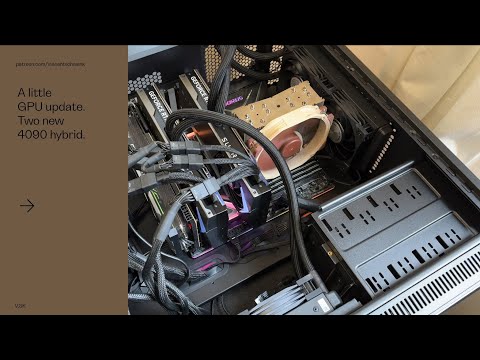
but I don't know if Daz supports two cards.
Daz studio does support multiple GPUs.
BUT they are used independently in parallel. The entire scene gets loaded into each card - if you have a 6 GB card, a 12 GB card, and a 16 GB card and the scene needs less than 6 GB all three will be used. If the scene requires 8 GB of vram the 6 GB card will error out on insufficent memory and only the 12 and 16 GB cards will be used.
I currently have an 11 GB 1080 TI, a 12 GB 3060, and a 16 GB 5060 TI; all three play nicely together in the DS6/2026 alpha release. The 5060 is not supported by the Iray version used with DS4, so onlly the 1080 and 3060 get used.
Some real numbers - simple scene, one g8f clothed.
1080 TI 5 minutes 46.44 seconds
3060 3 minutes 34.18 seconds
Both 2 minutes 30.66 seconds
Thanks! That is pretty linear. 1/5'46 + 1/3'34 = 1/2'30, more or less. If there were no penalty, it would have taken 2 min and 12 seconds. 132/150 = 0.88, so, about a 12% penalty. I conclude that the time-to-render with two cards is 0.56 of the time of one card. That is way better than SLI results back in the day.
Wow, on Ebay you find a bunch of RTX5090 cards for less than $2k. Located abroad and sold by people w zero reviews but 100% positive rating. But the purchase is covered by Ebay's guarantee...
you can only use the VRAM limit of the smallest card AFAIK
I tried it for a while and ended up removing the lower card as too limiting
so you really need 2 identical cards
Back in the day, I ran 4 x 2080ti and it scaled pretty much linearly. Not quite, but close.
Maybe for SLI, but not Iray rendering. If the scene won't fit in the smallest card that card will error out with insufficient memory but the other card(s) will continue. Back in the day I had a 980 TI (6 GB) and the 1080 TI (11 GB); I had them both enabled and roughly one third of the scenes failed on the 980 but rendered on the 1080. And the next render I triggered would initialize and start loading both cards again.
it was admittedly quite a few years and versions ago, maybe different now
Last year I ran two gpus in my Ryzen 7 3600X. A RTX 2060 Super with 8gb and a 1060 OC with 6gb. I removed the 1060 as I needed the pci slot to add another hard drive. All my sata ports where occupied, so I had to free up a pci slot for the sata adapter card.
I found the two gpus seem to render faster than the single 2060, but I did not do any benchmarks. It also ran a tad hotter inside the case with the two gpus.
No, this is always the way that Iray has worked - each GPU is independent (essentially each does an imteration and the manager just stacks them). Linking did require matching cards, however.
OK, this may be off topic but ... I've been setting up scenes in the fancy new alpha release and then rendering them in DS4 (because it has render queue.) I just now bailed out of a render at 15 minutes and, leaving DS4 open and ready to resume, opened the same frame in Alpha and was blown away - after 3 minutes I had a more complete final than DS4 had achieved in two hours. I'm sure looking forward to the plugins updates!! I'm feeling a lot less pressure to spend my meager resources on hardware.
You were using a GPU that was supported in both (that is, not Brockwel/50x0)?
It can be viable if you have 2 cards running each at 16x but you need something like a threadripper with adequete PCIE lanes to do it
For rendering the bandwidth is usually not that important, since there isn't a vast amount of data going back and forth compared to the number of calculations to be performed.