Help with ultrascenery 2 custom footpath

Am I trying to make a village layout with my own footpaths? But I'm still having trouble, as you can see some of the grass is going through a building. Is there any way I can remove some of the grass? Or is there an easier way to do this? I added a path layout in the height menu for US2

thanks again 
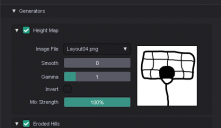
Screenshot 2026-01-12 052459.png
467 x 270 - 12K
Post edited by Richard Haseltine on

Comments

  • Richard HaseltineRichard Haseltine Posts: 109,032

    Moved to techncial Help as it is not a Daz Studio application question.

    I can't see the linked image as Imgur is blocked heer for soem reason.

  • It's weird it won't let me upload it either, but it's basically grass going through the lower building 

  • MelanieLMelanieL Posts: 7,789
    edited January 12

    You need to add a mask to the grass layers in the Ecology section  - I would add it to all layers actually in case a tree springs up there if you change any other parameters. 

    ETA: I think the height map you've already created would work.

    Post edited by MelanieL on
  • MelanieL said:

    You need to add a mask to the grass layers in the Ecology section  - I would add it to all layers actually in case a tree springs up there if you change any other parameters. 

    ETA: I think the height map you've already created would work.

    Thanks for the reply, it does help to a certain point, but when I put a house that's on the grass, the grass goes through the doorsteps but what i end up doing was make the path winder and place the house nearer to the path xD 

  • barbultbarbult Posts: 26,431
    Keep in mind that UltraScenery2 grass is made up of clumps of grass, not single blades. Grass clumps adjacent to a masked off spot can still extend into the masked area, because the calculation of in or out uses the grass clump origin point, not the full area covered by the grass clump.
  • barbultbarbult Posts: 26,431
    Rather than fixing your grass mask over and over by trial and error, you can render twice, once with grass and once without and compositing them in an image editor remove the pokethrough grass.
  • An alternative method is below.

    1. Put the building & items in position on the terrain.
    2. Take a top camera screen shot of the whole US terrain as big as your screen permits. Or render it as a huge image through a top camera with no perspective effects if you can.
    3. Crop the image to the terrain in a graphics package.
    4. Paint the grass free areas on another layer in black over the areas that need to be masked. If this is a pixel or 2 bigger than you want, that's good.
    5. Once the grass-free areas are defined, on another layer, make a white rectangle covering the entire image and put that layer behind the black layer. That way you shouldn't be able to see the terrain image at all.
    6. Save the mask image
    7. Use this in the graphics editor to create further masks for other plant types (presumably the tree free area will be bigger than the grass free area etc.).

    I have found this way works well with the images I've created, but can't guarantee it will work with all - and Barbult has more experience than I on this.

    Regards,

    Richard

  • barbultbarbult Posts: 26,431
    Yes, Richard, I've often used that same approach. That is basically what I meant when referring to fixing the grass mask over and over. Since it involves guessing how much to expand the masked area, it is easy to mask too much or too little, and to have to modify it and try again. If you don't have to be exactly right along a hard edge, it works well. There is also Totte's Mask Builder II to easily mask rectangular or circular areas, but that would be difficult to use for a detailed mask, as in this user's example.
  • cosmicdawnseriescosmicdawnseries Posts: 259
    edited January 15

    thank you for the replys i appetice the help, here anyway you can shoe example i think i get what you mean, render the images where all the houses are then go over them all in black/white and use that as the layer mask? im still new to US2 thanks for your time 

    richardandtracy said:

    An alternative method is below.

    1. Put the building & items in position on the terrain.
    2. Take a top camera screen shot of the whole US terrain as big as your screen permits. Or render it as a huge image through a top camera with no perspective effects if you can.
    3. Crop the image to the terrain in a graphics package.
    4. Paint the grass free areas on another layer in black over the areas that need to be masked. If this is a pixel or 2 bigger than you want, that's good.
    5. Once the grass-free areas are defined, on another layer, make a white rectangle covering the entire image and put that layer behind the black layer. That way you shouldn't be able to see the terrain image at all.
    6. Save the mask image
    7. Use this in the graphics editor to create further masks for other plant types (presumably the tree free area will be bigger than the grass free area etc.).

    I have found this way works well with the images I've created, but can't guarantee it will work with all - and Barbult has more experience than I on this.

    Regards,

    Richard

    Post edited by Richard Haseltine on
  • cosmicdawnseriescosmicdawnseries Posts: 259
    edited January 15

    barbult said:

    Rather than fixing your grass mask over and over by trial and error, you can render twice, once with grass and once without and compositing them in an image editor remove the pokethrough grass.

    thank you for the help ill give it a try

    Post edited by Richard Haseltine on
  • I really can't get to my DAZ machine until tomorrow afternoon (24 hrs after this post). I will create images for each of the steps then.

    Regards,

    Richard.


  • cosmicdawnseriescosmicdawnseries Posts: 259
    edited January 16

    thank you if you can that will be appreciated! :)


    Post edited by cosmicdawnseries on
  • richardandtracyrichardandtracy Posts: 7,350
    edited January 16

    Right. I have the images, but as my PC is offline I'm having to use a tablet, so this may take some time.... All done now.

    This all took under 50 minutes. Start with an UltraScenery landscape with building.

    Now, a plan view render showing all the trees growing up through the building.

    So, turn off all the plants to see only the ground, water and building. Note all the little white squares in the bottom left, these are the masks we're trying to change.

    Now render the top camera, 2000 pixels square centered on the terrain.


    In a suitable graphics package, crop the image to the terrain.

    Now, on a new layer, start painting over the building in black. This area is devoid of plants due to the building (or paths).

    The black is where you don't want any plants.

    Now start painting the white part of the mask on a new layer. You can completely fill the layer, doesn't matter.

    Now the finished mask layer:

    This layer overlaps the building mask, so time to push it behind the building mask. And save the mask.

    We now want to create a tree-free clearing around the building. So, juggle layers to see the terrain again and paint a tree free clearing:

    Now, juggle layers to get the white background layer behind the black clearing mask:

    Save mask.

    Now go back to DS, and in the UltraScenery2 tab, go to the ecology and put in the building mask for the small plants and clearing mask for the big ones by clicking on the white mask square (bottom left).

    Now you can render:

    Oh. Look!

    No plants growing up through the building.... This was the first render I did after the above. It got to 80% 48 minutes after the first screen shot. It takes some time, but once you know your graphics package (unlike me) it goes quite fast.

    Hope this helps,

    Richard.


    Image1.jpg
    1843 x 902 - 463K
    Image2.jpg
    2000 x 2000 - 3M
    Image3.jpg
    1907 x 1019 - 850K
    Image4.jpg
    2000 x 2000 - 1M
    Image5.jpg
    1928 x 1928 - 1M
    Image6.jpg
    1928 x 1928 - 1M
    Image7.jpg
    1928 x 1928 - 1M
    Image8.png
    1928 x 1928 - 33K
    Image9.png
    1928 x 1928 - 39K
    Image10.jpg
    1928 x 1928 - 1M
    Image11.png
    1928 x 1928 - 656K
    Image12.jpg
    1917 x 1029 - 615K
    Image13.jpg
    1920 x 1080 - 2M
    Post edited by richardandtracy on
  • cosmicdawnseriescosmicdawnseries Posts: 259
    edited January 16

    THANK YOU FOR THIS! much appreciated for the help!

    Post edited by cosmicdawnseries on
  • richardandtracyrichardandtracy Posts: 7,350
    edited January 16
    The mask is an image somewhere on your computer. Click on the white square that is in the bottom left corner in line with each plant type. This will pop up with a list of current images used in the scene. If the mask is not already in the scene (and first time you use it, it won't be), press the 'browse' option and navigate to the mask image. Having selected the mask, move on to the next plant in the ecology and so on. Hope that helps. Regards, Richard.
    Post edited by richardandtracy on
  • thank you alot for your help you've been awesome <3

  • I do hope it's what you needed. Regards, Richard
Sign In or Register to comment.
