content manager SQL not working.
 alan bard newcomer
Posts: 2,431
alan bard newcomer
Posts: 2,431
3.66 gigs in the CMS roaming folder.
from the open program I can connect to my cart, my wishlist, my account, my gallery but can't login
but can't login cause cms is not funcitioning.
Side note DIM has had no problems down loading and as far as I can tell it's not allowed through the firewall.
Any chance I need to set up a public network.
Even found a place to start stop CMS in the content window side bar and trying that still throws the no cms window.
Riversofts character creater with the skin stuff for 8 to 9 wants the CMS to work
---
Reinstalled the CMS the 64 bit version
---
My brain is getting tired looking at all these little corners of the computer.
Not working on 4.24, 4.24 beta or alpha
---
I think I've checked everything suggest in some other places
only thing I haven't done is hooked the win 7 machine back up.



Daz 3D is part of 
Connect
DAZ Productions, Inc.
7533 S Center View Ct #4664
West Jordan, UT 84084
Licensing Agreement | Terms of Service | Privacy Policy | EULA
© 2026 Daz Productions Inc. All Rights Reserved.
Comments
What happens if you select a different Content Cluster folder in Edit>Preferences>CMS Settings - does it then work (albeit with an empty database)?
Intallling the PostgreSQL in DIM installs it or does it installl Daz driver to connect to it?
Is PostgreSQL a separate install? Or part of the libraries installed with daz?
---
There are not alternate CMS in the drop down menu in the preferences
But the Base folder has 4 folders, only one of which seems to have much data
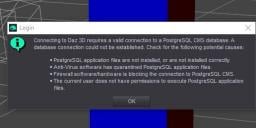
But Daz says it can't connect to a valid database nor will any of the "login" options work
Okay, looks litke postgreSQL is not installed in the program folser
According to gootgle should be in the prog folder and it's not
So should i go and get a copy or is this normally done by the daz installer?
And which verion of Post does Daz require?
which verion of these will make daz happy as apparnly I don't have one installed
Have installed "18"
daz preferences say port 1024 reset SQL to same port
and still opening program says can't establish a valid sql connection.
As I recall you can't change the admin level of daz?
You want only one version of PostGrSQL installed, 32 or (usually) 64 bit - but it should be consistent as they are not cross-compatible. The exact version doesn't mater as it has not chnaged for a while. Ignore the Google response - that is for a stand-alone installation, not the version bundled with DS.
Assuming it is there, which it was if it was working before, Edit>Preferences>CMS Settings, there is a path labelled ContentCluster. Click the ... button and select a diffreent folder (ideally on a different drive) and see if the PostgreSQL errors go away.
only one showing but should I try pointing it down into the folder in roaming under base that has content.
But that would be after sql is working.
I can't complete a login from connect because there's not valid CMS connection and that won't be part of the database stuff would it?
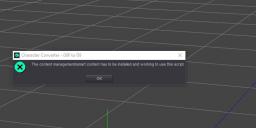
The image is what pops up with starting the program or does the "login" refer to loging into CMS as opposed to logining into Dazs computer?
---
I am cleaning space and going to set up the win 7 computer. (just put away a couple weeks ago naturally).
I don't use smart content or connnect so I can't tell if the CMS has ever worked on the win 10 machine.
Since PostgreSQL wasn't installed I don['t know if it ever was.
The ContentCluster folder is where the database goes, select a different, empty folder - if that works then the issue is your database, if not it is the database engine (PostgreSQL) or settings.
In preferences it reads: "C:/Users/Bard/AppData/Roaming/DAZ 3D/cms"
does this automatically look into the folders inside "cms"?
inside cms there's a folder called "Content Cluster" and inside that are more folders, the one named "base" has four folders with numeric designations one of which has 3.6g of data.
---
So the question is do I have to find something specific in the cms folder to point at?
---
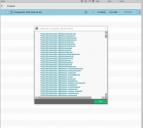
And apparently pointing at a diffrent folder will change anything that exists according to the message below.
---
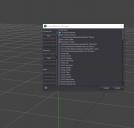
Second image is what the preferences opens to just pointing to cms
first image is where I told it to look at the next folder in the "Content Cluster" one and that seems to hint at death of data if I do that.
According to windows PostgreSQL is running (now --- i had to install it) and still showing "no valid connection".\
Okay update midnite 1/7 daz time.
Got the windows 7 machine up and running logged in after opening and it worked and prefs show the same folder roaming daz etc cms
and the same port assigned.
===
logging in in 4.22 on win 7 it gives me a space to enter my password
4.24 just logs in and says can't create a valid connection.
auto login is turned off.
====
Fixed and I want to say it was a >cluster 5***"
despite uninstalling the SQL and reinstaliing
and then uninstalling and forcing a fresh installer for SQL
Still not working.
But the un-install does remove the cms folder from roaming.
So I uninstalled SQL then manually removed the cms folder from roaming
then installed SQL and it rebuilt the cms folder and will now talk to it.
>>> and having solved that so that Riversoft arts character converter will start
have to figure out how to save a custom character as a character because the converter will not recognise a character preset nor a scene subset as a character.
As I said, point it at an empty folder - one that is inside the existing Content Cluster folder ccertainly won't be a good diea, even if it works.
my typo ... uninstalling cms/sql doesn't not remove the cms folder in roaming.
It empties the sql folder in daz and apparently reinstalling the sql doesn't connect it to the cms folder in roaming.
so I uninstalled the sql then removed the cms folder comply from roaming and installed sql
that created a new cms folder in the roaming folder which is now connected to the sql in the daz folder
It did however cut the size of the CMS folder to 44mb 1231 files from the previous one which was 3.66gb 1313 files.
So the next question would be, what did it delete?
I did just move the old folder so I can try to merge it back in so the missing items are put back in while the duplicate ones are left alone.
===
The ContentCluster folder is the database - by removing it you removed the existing content data, you will be able to reimport the product metadata but unless you exported user data or have a back up you can restore the entries for your own files and any customsiation you made to store entries have been lost (the files themselves are still there, of course). Uninstalling the PostgreSQL didn't touch the AppData folder because unisntalling should not (at least by default) touch user data.
I am unclear as to whether the clean database is now allowing you to connect successfully - if it is then it may well be that the database was corrupt anyway.
when you click the login from the connect drop down menu is that to connect to the Content Cluster (folder/database) or is it to connect to Daz for using Connect content etc?
The Connect content would not be on my computer? So instead of loading it from my computer via DIM it's loading via an online conection?
I've never used connect and it wasn't until I tried to use Riversofts Character Converter have I had a script or anything that complained the cms --- database wasn't available.
----
As for the login from the connect menu on the windows 7 machine it opened a dialogue for me to put in my password and then completed the connection.
So the win 10 machine it never offers that option just said "it failed to created an active postgreSQL connection which meant it couldn't talk to daz for Connect?
---
Upon starting now it doesn't say "it couldn't create a postgreSQL connecion any more and Riversofts character creator works because it can look up all the characters to convert.
The log-in is to your account, Connect will use it to download content (you will need to update metadata for it to have the full list of what you own at that point), check membership for the Premier features (which matters only if you are a Premier member), get personalised notifications to show in the File>New dialogue. The PostgreSQL message is not directly related to that - it is trying to access the database so that it can populate the content panes that use it.
Connect does install files locally, though it uses a different location and puts each product in its own folder.
That would seem to be what was NOT happening. It couldn't login because it couldn't establish a connection which I think was "password" related?
It never asks for the password (like win 7 does).
Would being unable to complete a login to daz mean not only that connect was not available but that the CMS connection was not available.
---
Was the cms connection enabled because the connection to daz was finally working?
The first fail seemed to be any login to the entire daz system from the program and second message about fixing postgre was trying to launch the character conversion script which uses the CMS data base.
---
If the cms data base is broken should that interfere with the program "login" from the connect menu happening?
As I saif, logging into your account (Connect>Log In) is not the same connection as connectiong to PostgreSQL (though the latter does use Internet protocol, on the local machine). I still suspect disc space or database corruption - the error message doesn't really explain what factirs other than literal connectivity might be at play.
the intial message suggests an inablilty to log in to daz . . . but unlike 7 it doesn't say here stick in your password which is why I thought there were login issues. There were but it was two issues the login and the CMS in one error message.
But getting the cms fixed also fixed the login l. . . so it's good now.
---
As the alpha had any changes in the geo editor? I continue to get fatal errors when selecting a surface in the tool pane.
Although that may be related to the fact I think the interface shows it's ready for you to do something when the program is still updating info internally and the prog dies because you're trying to access something that isn't done updating .
Do the crashes happen with any geometry or only certain things?
the last bunch seem to be on a mesh I thickened using thickender but other ones done the same way laying out a plane and punching holes for windows and then thickening have worked fine.
But I suspect that from the number of crash messages that say null return when I select a surface or poly that I move too fast. The interface doesn't show a spinning wait symbol so I click the next item and that's when I often get a "null value" suggesting that I hit something before the internal "diagram" wasn't updated for my previous move?
Will try to remember to pull that mesh back in and see if I can recreate it.