Question about a pane that popped up and I don't know what it is
 snickerbob
Posts: 26
snickerbob
Posts: 26
in The Commons
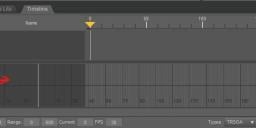
Hi. I was working on something earlier and suddenly the pane illustrated in the attachment (with the red arrow) appeared. I supposed I did something to make it appear, but I don't know what it is or how to turn it off or on. Can anyone explain?
Thanks!
Screenshot 2025-12-10 120232.jpeg
696 x 297 - 30K

Daz 3D is part of 
Connect
DAZ Productions, Inc.
7533 S Center View Ct #4664
West Jordan, UT 84084
Licensing Agreement | Terms of Service | Privacy Policy | EULA
© 2026 Daz Productions Inc. All Rights Reserved.
Comments
That is the timeline, just left click the tab with your mouse and it will drop back to the bottom of the screen. I use it mostly for simulations.
There is a tab at the top where you can find available panes listed; you can click them to show or turn them off. That's the easy part. The hard part is when I undock them accidently. OMG my little brain has such trouble with getting them back where I started lol.
Interestingly I found the timeline useful for creating new poses. For example, I put one pose a the '1' positon and another at say the '5' position and then see how the middle poses look as the figure transitions from 1 to 5. I occasionally I like one of those transitional poses best. It's just fun to play around with stuff...
Happy Rendering!
Menu, rather than tab, I think - WIndow>Panes(Tabs)
In the current version of DS there is a button next to the Keys: caption that will toggl;e the key graph on and off - in older versions it is in the option menu, under Preferences>Key Graph