How to tile terrains?
 daveso
Posts: 8,327
daveso
Posts: 8,327
I used to do this all the time, tile multiple terrains that all had their edges where the mesh lines up perfectly with the next tile. For whatever reason, I cannot get it right now. I've followed a couple tutorials that I found, and the result is not what I want.
Anyone have the ability to do this?

Daz 3D is part of 
Connect
DAZ Productions, Inc.
7533 S Center View Ct #4664
West Jordan, UT 84084
Licensing Agreement | Terms of Service | Privacy Policy | EULA
© 2026 Daz Productions Inc. All Rights Reserved.
Comments
1 Hold down the Ctrl-key and click on the terrain thumbnail.
2 Enter the TE and create a new one using any Fractal option except Bryce Classic (click on down arrow right of Fractal).
3 When happy, deselect all three Random options (when holding down the Shift-key and click on any of the three options, all three get deselected)
4 Set the Resolution as you like it, default is 512.
5 Click on the Fractal button to create the same terrain anew with the desired resolution.
6 Exit the TE. Keep the generated terrain in the original size and original position.
There is the "Bryce Terrain Editor Advanced Filters" available at Daz 3D you may not (yet) want to buy: https://www.daz3d.com/bryce-terrain-editor-advanced-filters
and there is a detailed description of the Bryce Terrain Editor. Below a picture copy of the tiling part. I hope this helps.
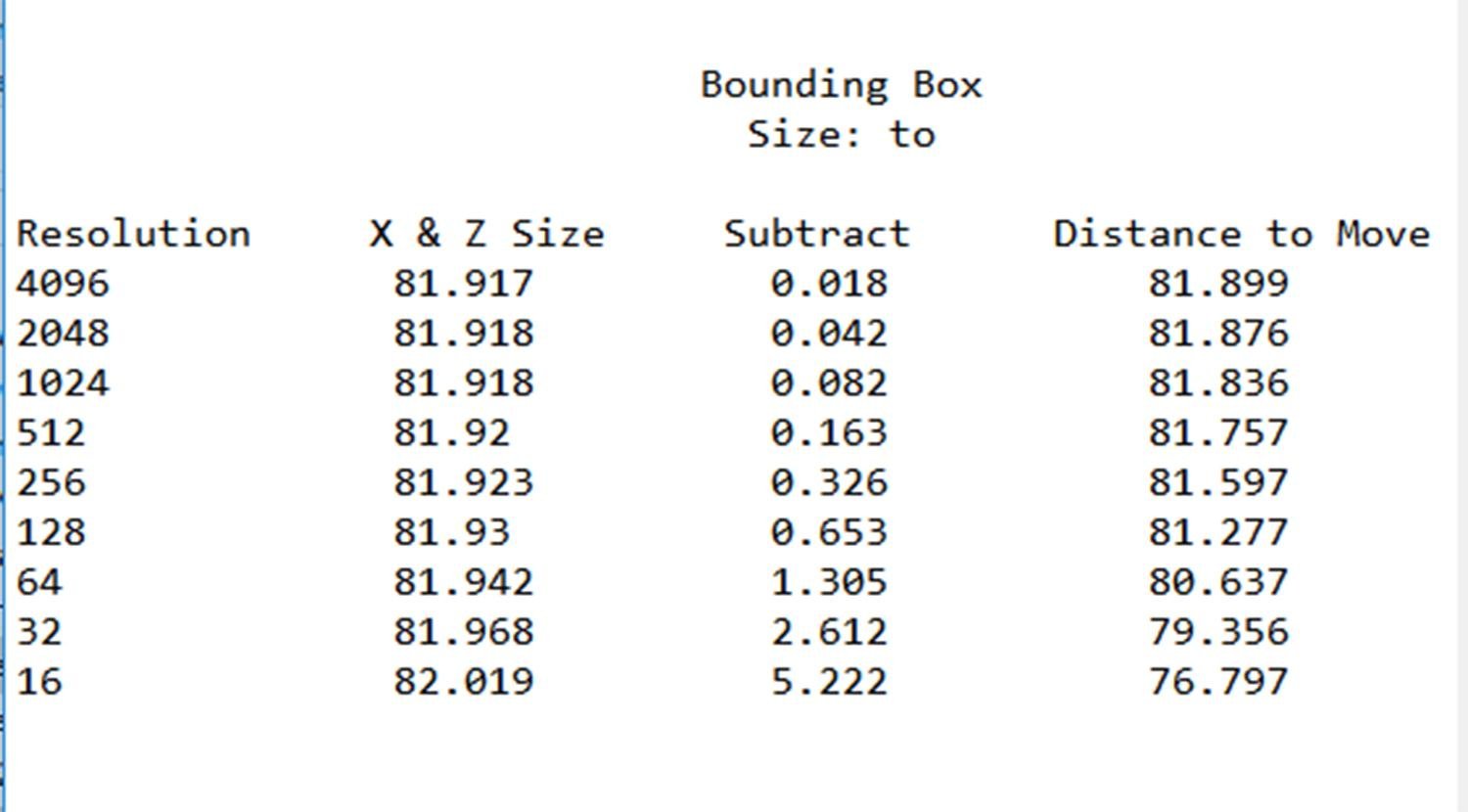
Every terrain resolution (in the terrain editor) will generate a different-sized terrain. The size shown in the terrain's attributes menu is the size of the Bounding Box, not the size of the actual mesh that makes up the terrain's geometry. This is a cheatsheet that shows how many Bryce units to move for the different terrain resolutions.
 A YouTube Tutorial
https://www.youtube.com/watch?v=9p8_TOHxDE8
thank you both. I'll give this a try.