[Solved] Weird Iray Problem (I Think?)
 Lucky13guy
Posts: 92
Lucky13guy
Posts: 92
Hey folks,
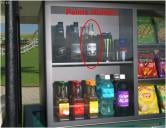
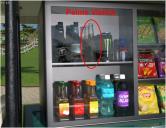
I've got kind of a weird problem going on. I'm trying to render a shot on Mely3D's Golf Course, but the label on one of my beer bottles seems to have disappeared. After messing around with my scene for longer than I care to admit, I finally figured out that this only happens when three specific nodes, "GC Way Ext Palm", "GC Way Ext ferm", and "GC C3" are visible. I can hide both the "GC Way Ext Palm" node and the "GC Way Ext ferm" node and the problem goes away. However, if I hide the "GC C3" node instead, and keep the other two nodes visible, the problem also goes away.
I may be able to get away with hiding the C3 node for this scene but I'm hoping I can find a solution, as I'm going to need those three nodes for future renders. And the beer bottle is an easter egg for the person I'm doing the render for, so I kinda need to keep that. All shaders are set to Iray Uber (MDL), so I don't think it has anything to do with a random 3Delight shader being thrown in there somewhere, if that's even a possiblity.
Anyone have any ideas, here?
Thanks in advance!

Daz 3D is part of 
Connect
DAZ Productions, Inc.
7533 S Center View Ct #4664
West Jordan, UT 84084
Licensing Agreement | Terms of Service | Privacy Policy | EULA
© 2026 Daz Productions Inc. All Rights Reserved.
Comments
Figured it out! After hiding the "GC C3" node and trying to render, the label still wasn't there. That got me to thinking about how clothing items can appear to fit perfectly in Iray preview mode, but there still might be some poke-through when rendered. So I made the logo slightly larger and pulled it away from the surface of the bottle just a smidge and that fixed the problem!
But why does this happen? Why does Iray preview mode hide poke-through issues if they can still be visible in the final render?
Iray preview uses some shortcuts/simplifications to provide a close approximation of the render while also being quick and trying to keep the interface somewhat responsive. I have found it's best not to think of it as 100% accurate but just "mostly-there". I have found that things behind glass or in relfections sometimes do not show up in the preview even if they would be there in an actual render so I am not too suprised that you saw a similar issue.
There are many hairs that do not display the same in preview that they do in an actual render, some items have different SubD values for preview and full render which can affect poke-through. It is also possible to turn off the display of things in preview while still including them on full renders.
That makes sense. If preview mode didn't take some shortcuts, it would be a lot more demanding on computer hardware and would kind of defeat the purpose of giving you a preview in the first place.
I didn't even think about the SubD values. In my case, the bottle was at base resolution, so I wouldn't think that would affect the final outcome as much, but on items set to high resolution, the render SubD value is usually higher than the other SubD value, so that makes a lot of sense as well.
Thanks!