KBXF Slow Motion Player [Copy Approval]
 kabexef
Posts: 93
kabexef
Posts: 93
When an animation is played in real time, you often only see individual frames and the animation appears to jump back and forth randomly. This is because the complete creation of a frame usually takes more time than is available at the selected playback rate.
The «Slow Motion Player» offers two additional options for playing your animation:
- Frame by Frame - In this mode, the «Slow Motion Player» gives each frame the time it needs to be fully created. This allows you to play your animation as quickly as possible without losing a frame.
- Slow Motion - In this mode, you can even determine the time available for creating a frame yourself.
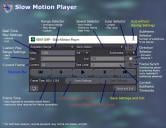
All modes offer the options ‘Select playback range’ and ‘Looped / Play once’.
In ‘Frame by Frame‘ and ‘Slow Motion‘ modes, you also have the options ‘Forward/Backward’ and ‘Play Subframes’.
The playback bar, various displays and tooltips, as well as the option to save settings in the scene, round off the appearance and possibilities.


Daz 3D is part of 
Connect
DAZ Productions, Inc.
7533 S Center View Ct #4664
West Jordan, UT 84084
Licensing Agreement | Terms of Service | Privacy Policy | EULA
© 2025 Daz Productions Inc. All Rights Reserved.
Comments
Thank you very much for this. I was just getting into animation, and the regular timeline preview is all but useless; this will save me so many headaches it should come in a prescription bottle.