Weird Conforming/Auto-Fit Issue
 jecswp
Posts: 78
jecswp
Posts: 78
The product with the issue is SWAN Dance Costume Kit
It is G8/8.1 product, but I want to use it on this particular G9 character. I have tried auto-fit and converted it, but no matter what, there is this weird connection to the forearms. Is there a setting/morph I can change? Or is there a way to remove this conforming? Any help would be appreciated.
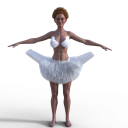
Swan.png
640 x 640 - 239K
Post edited by jecswp on

Daz 3D is part of 
Connect
DAZ Productions, Inc.
7533 S Center View Ct #4664
West Jordan, UT 84084
Licensing Agreement | Terms of Service | Privacy Policy | EULA
© 2026 Daz Productions Inc. All Rights Reserved.
Comments
It looks like part of the skirt was incorrectly weight mapped to the forearms by autofit or your conversion method. You may be able to fix it with the node weight map tool, but I don't know what bone it should be weighted to. Maybe the hip or pelvis? Maybe you can see what the rest of the skirt is weight mapped to. Look for tutorials on Daz Studio weight mapping.
Delete out the arm bones from the transfer.
To do this, switch to the Joint Editor Tool(bone with a pencil on top), select the Tutu, then select each bone starting at the Upper arm.
AFAIK, you have to do one joint at a time, so it's a bit tedious, but you can select the bones in the scene tab.
Then right click while the mouse pointer is in the viewport and select Delete>Delete bone.
I'd recommending unfitting the tutu and moving g9 back a few ticks, or deleting it(g9) out, so you're only deleting out the bones of the tutu, and not g9.
Be sure to save it as a new Wearables preset, so you don't have to do this again in the future.
Yes, Auto Fit brought the tutu some wrong weight ~ But I'm afraid just deleting arm bones would be not enough on this tutu. You better delete Spine 3 and its childeren bones. I recommend this Script which can delete selected Bones all together which is much faster than using Joint Editor : https://www.mikededes.com/delete-selected-bones/
Expand nodes from Spine 3 bone on G9's Tutu in Scene pane, select Spine 3 and its children bones, run the above Script. (screenshot 1)
Then you can further copy Weight Map from G8's Tutu's Pelvis and Abdomen Lower bones to G9's Tutu's Pelvis and Spine 1 bones, so as to make an even better result (screenshot 2).
How to : check this post : https://www.daz3d.com/forums/discussion/comment/8724751/#Comment_8724751 The way is almost the same.
Y'all are awesome! Thanks so much for your help. Worked like a charm.