How to preserve the file name in Render Settings
 Drogo Nazhur
Posts: 1,347
Drogo Nazhur
Posts: 1,347
All of the other settings such as the engine being used, the default sizes, etc., are automaticly saved from the previous render. Even if I power down the Computer and leave it off for days, the next time I go into the editor, the settings are still there EXCEPT for the filename. The filename always is left empty.
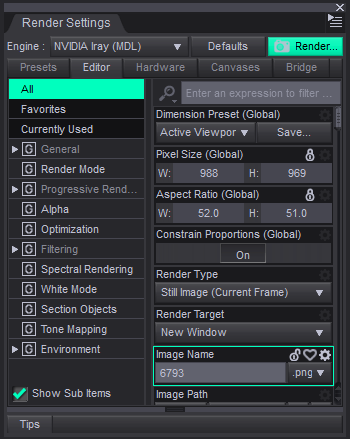
How can I preserve the filename from session to session? Thank you in advance.
renderfilename.png
350 x 439 - 30K
Post edited by Drogo Nazhur on

Daz 3D is part of 
Connect
DAZ Productions, Inc.
7533 S Center View Ct #4664
West Jordan, UT 84084
Licensing Agreement | Terms of Service | Privacy Policy | EULA
© 2026 Daz Productions Inc. All Rights Reserved.
Comments
Unfortunately, this is one of a couple settings that aren't preserved between sessions.
You can't even preserve it with any type of preset.
However, you can use a script to set it - and even have a script set to run on startup or new scene to set it to a desired value. See http://docs.daz3d.com/doku.php/public/software/dazstudio/4/referenceguide/scripting/api_reference/samples/rendering/render_settings_find_property/start ;
I boubt if that's a feature....but you can make it non-empty with a file name by using a Render Settings Preset.
However, as default, Image Name property is not saved in any Render Settings Preset... so you have to modify the Preset file to add an Image Name there.
- Firstly save a Render Settings Preset that you frequently use. Uncheck Compress File option when save it.
- Open the Preset file with Notepad++, add a coding block under "render_elements". (screenshot 1)
- Place this Render Settings Preset to: Preferences > Startup > On "Launch" > Load File:
This is a simple way to add a static file name. If you want to add a dynamic file name by adopting the last-used file name, I'm afraid you have to use a Daz Script to read the file name from Recent File List and place the string into Image Name field.