Starfall Dforce Dress??
 IceDragonArt
Posts: 12,972
IceDragonArt
Posts: 12,972
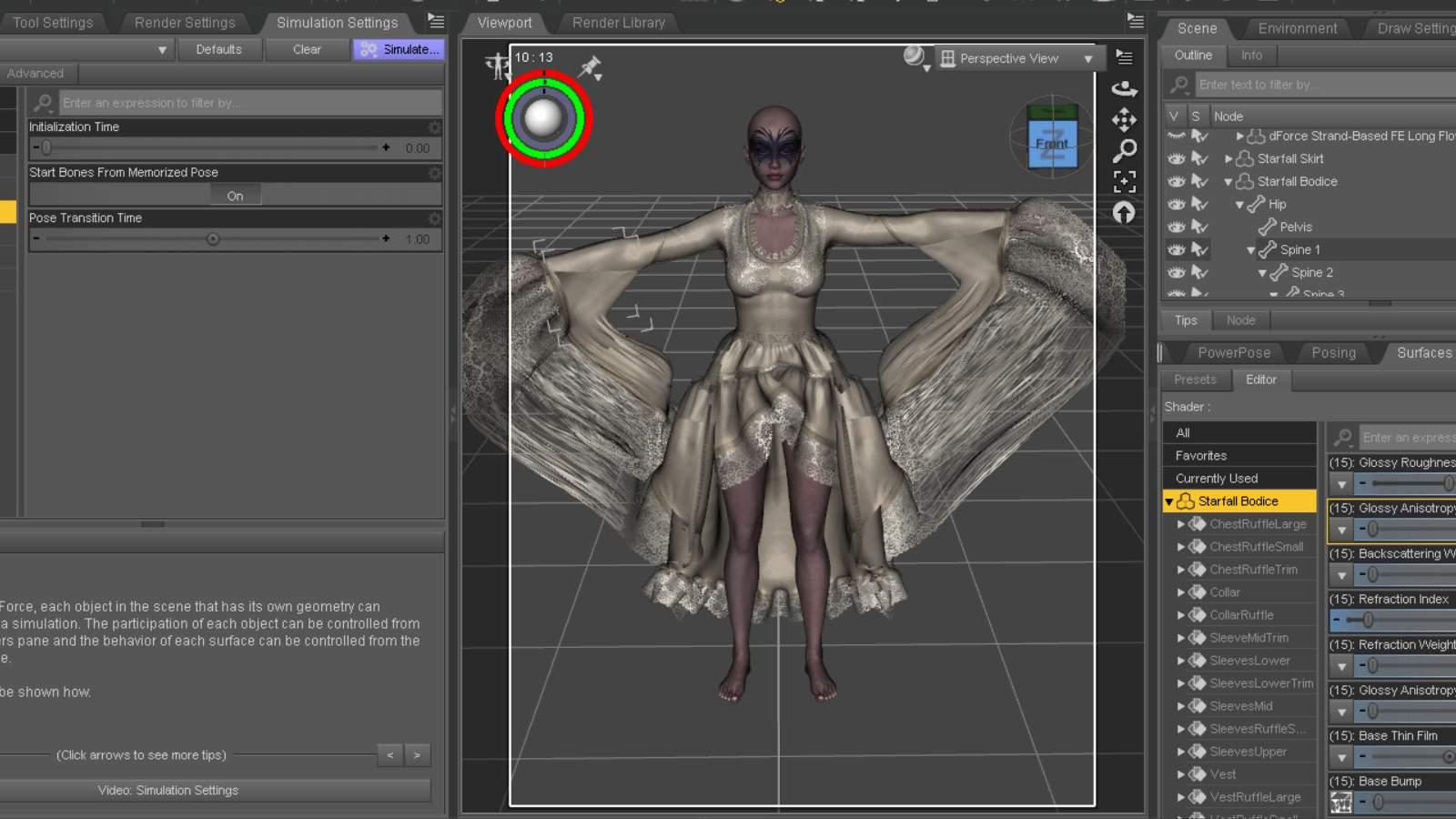
So if I load this onto GF9 you cannot move the arms without this happening much less use dforce to put it in a different pose. This doesn't even have Dforce applied to it, I removed it in an effort to pose it the way I wanted to start. Its like the sleeves are stuck to G9 Doesn't matter if the skirt is there or not. If I unparent and unfit, it drops down and the arms stay in the t pose. Moving it then will also cause this to deform. Its not usable like this at all.

Daz 3D is part of 
Connect
DAZ Productions, Inc.
7533 S Center View Ct #4664
West Jordan, UT 84084
Licensing Agreement | Terms of Service | Privacy Policy | EULA
© 2026 Daz Productions Inc. All Rights Reserved.
Comments
That's a common issue resulting from wrong weight mapping on such a type of dress with large sleeves ~~ (Some vendors don't optimize weight mapping after rigging the clothing ~~)
You can repaint the weight to fix it yourself... or you have to simulate with a Timeline or Start Bones From Memorized Pose option.
You also can fill a ticket asking the vendor to fix it...
I had finally been able to simulate it previously. I applied the simulation settings that are in the folder with the outfit, set the timeline to 61 and ticked it at 30 for the pose.
My first attempt was with the arms down, my second this morning was a ballet pose, Sweet Grace Pose 02 Leaning G9F, and while the sleeves didn't stick, the blouse and skirt essentially shredded over the arms, left breast, shoulder, and buttocks. I don't think Mesh Grabber can help this time. It is so bad I don't think I can post an image of it on the forums without violating the nudity rules. Even coloring the skin it is still iffy.
I want to try it again with adjusting some of the morphs first and mesh smoothing. I am not great with this but I love the outfit and want to figure out how to use it without issue.
Mary
https://www.daz3d.com/forums/discussion/comment/9343876/#Comment_9343876
I give a suggestion here for "fixing" the sleeves
I tried it again using bluejuante's https://www.daz3d.com/akki-hd-with-expression-for-genesis-9. Knowing where I had fabric shredded, I used the morphs that are part of the top and skirt and expanded the areas before the simulation. I also remembered to use dForce Companion 2.0 which I was able to buy before it was pulled out of the store and put behind a paywall. I only adjusted the Collision mesh resolution to 'Best'. The Timeline remained at 61 frames, the pose at 30, and I made sure to click on the Starfall Basic Sim Setting G9 to the outfits two pieces. While the hair is able to be simulated, I closed it off for this test. I also used an invisible plane under the character in case the outfit dragged on the floor.
I always do the timeline and I have tried it both with and without the start from memorized pose. Is it possible to remove the weight mapping and add my own?
I will give this a try thank you.
So weight mapping the sleeves worked perfectly. Thank you! I am working hard to learn as much about dforce as possible, so this was really helpful. Edited to add, I did lengthen the time line to 61 with the pose at 30