[Solved] dForce Collection 1 Sandals Missing Decoration?
 Lucky13guy
Posts: 92
Lucky13guy
Posts: 92
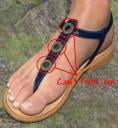
I'm a little confused here. I've had dForce Collection 1 for quite some time, but I JUST noticed that the sandals are missing the round decorations on the front strap. The shaders are there, but I can't locate the decorations themselves. Am I completely blind? Or were they dropped from the product before it was released and someone just forgot to change the images and remove the shaders?
Collection01-popup06.jpg
442 x 478 - 302K
Post edited by Lucky13guy on

Daz 3D is part of 
Connect
DAZ Productions, Inc.
7533 S Center View Ct #4664
West Jordan, UT 84084
Licensing Agreement | Terms of Service | Privacy Policy | EULA
© 2026 Daz Productions Inc. All Rights Reserved.
Comments
TLDR: Using the Load ALL preset will load a pair of Sandals that does have the Decorations on them.
I have this set and was pretty sure the last time I used those sandals that they had the decorations. But loading the dfC Footwear 01, like you said, they load without the decorations. BUT, if you load the dFC 01 Load ALL, (ie the whole outfit) the sandals that load with it will have the 3 decorations on it. Since they are simple props and using Rigid Follow nodes, Once you have the sandals with the decorations loaded, it's pretty safe to just browse to their location in the content follower, use the + sign and save them out as a wearable to overwrite the dFC Footwear 01.duf. You will also want to browse to file (by right clicking one of the presets and selecting that) and make a copy of the "dFC Footwear 01.tip.png" image (or rename it with a dash in front) BEFORE you save the new wearable.
You will also want to delete the dFC Footwear 01.duf.png that is created, simply so the presets look like they did originally. ( You will need to right click the dForce Collection folder and hit refresh for the Thumbnail to look correct again, after you have removed the dFC Footwear 01.duf.png and pasted over the dFC Footwear 01.tip.png (or remove the dash if you renamed it) image files.
Ha! Didn't even think about loading the whole outfit. But that did it. Thanks!