Daz filling all of my save file info with gibberish?
 Blando Calrissian
Posts: 665
Blando Calrissian
Posts: 665
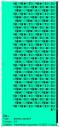
I've noticed that within the past year Daz has taken to populating my pop-up info boxes with a ridiculous amount of wingdings whenever I save scene subsets, poses, Face Transfer files, prop and figure assets, etc. This seems to happen regardless of the resource or what information I actually type into the save box pop-up prior to saving. Older saves (2024 and earlier) and Daz Store products don't seem to have the same issue. Is there a way to fix this?
The wingdings take up the entire vertical real estate of my monitor and then some. I have no idea how many characters, but I suspect it's quite lengthy given the delay between hovering over an icon and the pop-up box appearing.
(Spoiler: It was 7,019 characters)

Daz 3D is part of 
Connect
DAZ Productions, Inc.
7533 S Center View Ct #4664
West Jordan, UT 84084
Licensing Agreement | Terms of Service | Privacy Policy | EULA
© 2026 Daz Productions Inc. All Rights Reserved.
Comments
Edit>Preferences, check the Author name and edit if need be
Thank you, Richard!
Is there a way to correct the existing files?
I suppose you could edit them in a text editor - you may need to uncompress them first, the Author is in the initial block of data - or load and resave.
Line 7 in Notepad++ to be specific is the Author line.
Correct me if i'm wrong here, RIchard, but might they also need to modify the Emal and Website, if they have that setup in studio?
LInes 8 and 9, respectively if that's the case.
If they are messed up too, yes, but I thought it was usually just the Author field (which is the only one with functional significance - it needs to match that in the scene file for File>Save to work without a filename prompt).